What Is a HEIC File, and How Do You Open It?
HEIC is the photo format iPhones save by default. Why Windows, Android and upload forms often can't open it, and the cleanest ways to turn it into a JPG.
Computing··8 min read
A HEIC file is a photo saved in HEIF, the format iPhones and iPads use by default. It holds the same kind of picture as a JPG, in a noticeably smaller file. The catch is that a lot of software still can't open it, which is why your iPhone photos bounce off Windows PCs, some Android phones and plenty of upload forms.
The quick answer: on a Mac, iPhone or iPad it just opens. On Windows you need two small extensions from the Microsoft Store. Everywhere else, convert it to JPG first, ideally on your own device. The rest of this post explains what's inside the file, why support is so patchy, and how big the difference really is, with numbers we measured ourselves.
What HEIC actually is
Two names get mixed up here, so it helps to pull them apart.
HEIF (High Efficiency Image File Format) is the container. It's an international standard, ISO/IEC 23008-12, and it can hold several things in one file as separate items: the picture, a small thumbnail, metadata, even extra images. HEVC (High Efficiency Video Coding, also known as H.265) is the compression used for the pictures inside. A HEIF file whose pictures are HEVC-coded gets the .heic extension. The same container with AV1 pictures inside is an AVIF file.
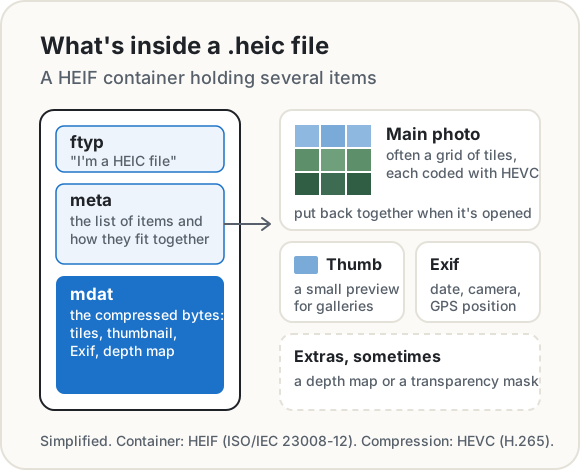
Apple moved the iPhone camera to HEIF in iOS 11, on iPhone 7 and later. Its reason is short: HEIF and HEVC "offer better compression than JPEG and H.264", so photos and videos take less space on the phone and in iCloud Photos while keeping the same visual quality.
How much smaller is it?
Apple doesn't give a number, so we made one. We took a public-domain photo of Yellowstone's Grand Canyon in winter, from the US National Park Service, cut it to 4032 × 3024 pixels (12 megapixels) and saved it as HEIC with libheif, the open-source HEIF library, at quality 50. Then we decoded that HEIC and converted the pixels to WebP and JPG at quality 90, the default in our Image Converter.
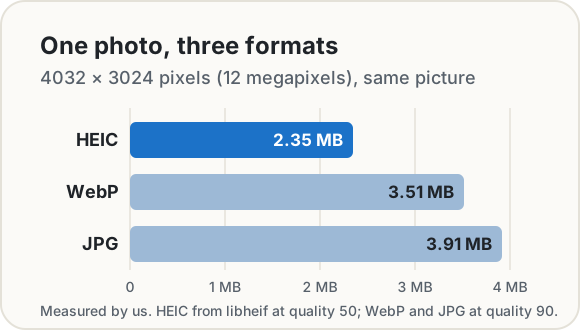
The JPG came out at 3.91 MB against 2.35 MB for the HEIC: about 1.7 times the size, from exactly the same pixels. That's one photo, and a hard one (a snowy canyon full of trees is a lot of fine detail), and Apple's own encoder settings aren't public, so your photos will land somewhere else. The direction holds, though. Save 1.5 MB a photo across a camera roll of 3,000 pictures and that's about 4.5 GB.
One thing conversion can't do is add quality back. The JPG is made from the decoded HEIC, so at best it matches it. It's just bigger.
Why Windows, Android and websites can't open it
The container isn't the problem. HEVC is. It's covered by a lot of patents: one licensing pool, HEVC Advance, says it licenses thousands of them on its own. Shipping an HEVC decoder means sorting out licences, so a lot of software leaves it out or makes it an add-on.
- Windows. The Photos app needs Microsoft's free HEIF Image Extension, and its Store listing says the separate HEVC Video Extensions package "must be installed in order to view images stored in HEIF files that use the .heic, .hif or .heif file extensions". That second one costs $0.99 in the US Store at the time of writing.
- Android. Android has included a HEIF decoder since Android 9, but Google's own format table marks it "device optional". So whether a given phone or app opens a
.heicdepends on the phone. - Browsers. Safari 17 and later, on Mac, iPhone and iPad, can show HEIC images. Chrome, Edge, Firefox and Samsung Internet can't. It's one reason so many upload forms say "JPG or PNG only": the page can't preview a HEIC, and the site's server would need its own decoder to do anything with it.
How to open or convert a HEIC file
On the iPhone: let the phone do it
- Stop making HEIC photos. Settings → Camera → Formats → Most Compatible saves new photos as JPEG. Photos you already took stay HEIC, and new ones take more space.
- Share instead of copying. When you send a photo by AirDrop, Messages or email and the receiving device doesn't support HEIF, Apple says it may be sent as a JPEG automatically.
- Plugging into a PC. Photos imported over USB might be converted to JPEG on the way. The option for this is in Settings → Apps → Photos: Keep Originals turns the conversion off, so leave that unselected if you want JPGs.
On a Mac: Preview
Open the photo in Preview, choose File → Export, pick JPEG from the Format menu, set the quality slider and save. To do a batch, open them all in one Preview window, select them in the sidebar and export.
On Windows: two extensions
Install the HEIF Image Extension and HEVC Video Extensions from the Microsoft Store. After that, the Photos app opens HEIC files, and you can save a copy as JPG from there.
In the browser, without uploading: Safari
Our HEIC to JPG converter runs entirely on your device. In Safari 17 or later on an iPhone, iPad or Mac, drop in a batch of HEIC photos and they convert right there: nothing is sent to a server. Location and other Exif data are removed by default, and you can save them all as one ZIP.
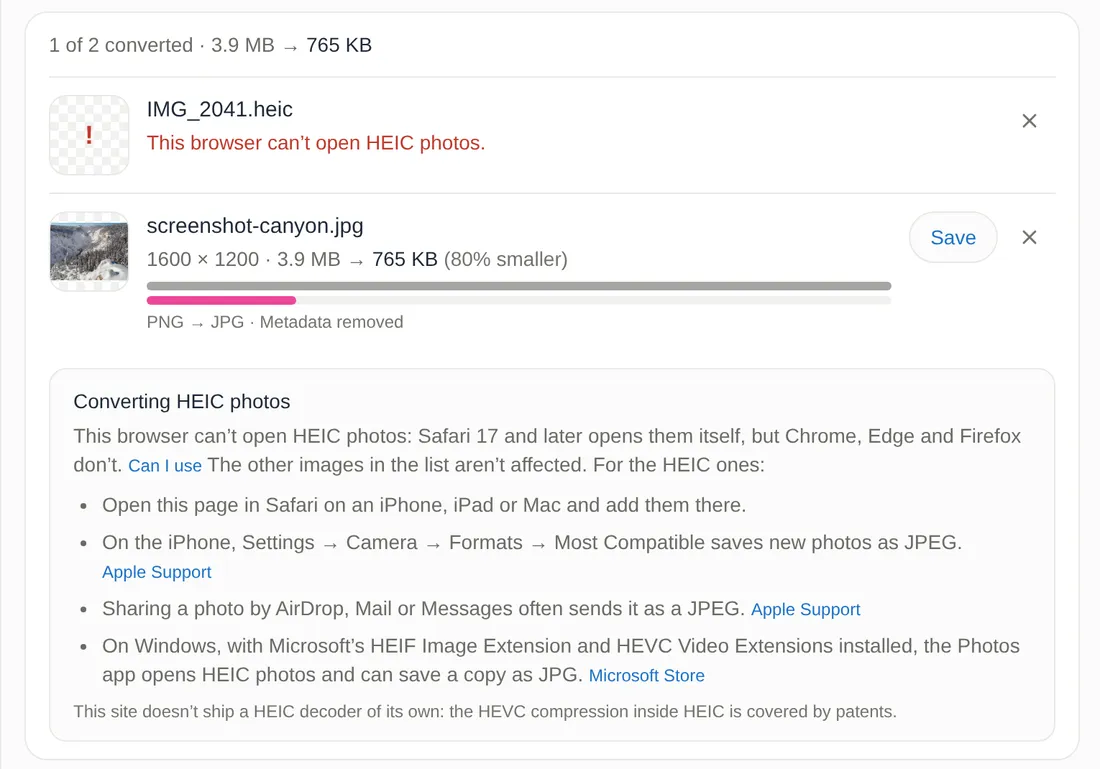
It only works in Safari, and that's deliberate. The converter uses the browser's own HEIC decoder rather than shipping one, because of those HEVC patents. In Chrome, Edge or Firefox it says it can't open the HEIC photo and lists the other routes in this post, while any JPG, PNG or WebP files in the same batch convert as normal.
Think twice before uploading photos to a converter site
Search for "HEIC to JPG" and you'll find plenty of free converters. Many of them work by uploading your photo to their server, converting it there and sending a copy back. That's a lot of trust to hand over for a file format.
A photo is more than its pixels. iPhone photos carry Exif metadata: when the picture was taken, on which phone and, when the Camera has access to Location Services, where. A picture of your kids at home, a passport scan or a screenshot of your bank, uploaded as the original file, sits on a computer you don't control, for as long as that site decides to keep it.
Converting on your own device skips the question, because there's no copy to delete later. And you can check any site's claim yourself: open your browser's developer tools, watch the Network panel while you convert, and look for a request about the size of your photo. We walk through that in how to edit photos without uploading them.
The short version
- HEIC is a HEIF container with HEVC-compressed pictures inside. iPhones use it because the files are smaller.
- In our test, the same 12-megapixel photo was 2.35 MB as HEIC and 3.91 MB as a quality-90 JPG.
- Windows needs two Store extensions, Android support depends on the phone, and only Safari opens HEIC in a browser.
- To get JPGs: set the iPhone to Most Compatible, share by AirDrop, Messages or email, export from Preview on a Mac, or convert in Safari with our converter.
- Don't upload personal photos to a converter you can't check.
Sources
- ISO/IEC 23008-12:2022. Information technology: High efficiency coding and media delivery in heterogeneous environments, Part 12: Image File Format (HEIF), Edition 2. iso.org
- Apple. Using HEIF or HEVC media on Apple devices. Apple Support.
- Apple. Convert image file types in Preview on Mac. Preview User Guide.
- Apple. Manage location metadata in Photos. Personal Safety User Guide.
- Microsoft Store. HEIF Image Extension and HEVC Video Extensions (price checked October 2026).
- Android Developers. Supported media formats: image formats table.
- Can I use. HEIF/HEIC image format.
- Access Advance. HEVC Advance patent pool.
- Test photo: US National Park Service, Views of Lower Falls from Inspiration Point, public domain. Encoded with libheif 1.23.5 (
heif-enc -q 50); WebP and JPG made by our Image Converter in Chrome.
.jpg)
Share this post
Keep reading
Computing· Oct 14, 2026· 10 min
Does Your Photo Show Where You Live? Check and Remove It
Phone photos can carry GPS coordinates accurate to a few metres. See what yours give away, which apps strip it, and how to remove it before you share.Computing· Oct 9, 2026· 9 min
How to Compress an Image to 100 KB (or 50 KB, 20 KB)
Job portals and visa forms want photos under 100 KB, 50 KB or 20 KB. What makes a file small, a worked example with real numbers, and the mistakes to avoid.Computing· Oct 9, 2026· 8 min
How to Merge PDFs Without Uploading Them
Combine PDF files on a Mac, iPhone, Windows PC or in your browser without sending them to anyone's server. Built-in ways, page order, file size and pitfalls.