Why Some Keys Don't Register: Ghosting and Key Rollover
Hold several keys and one goes missing, or a phantom appears. How key matrices, diodes, 6KRO and NKRO work, and how to test your own keyboard.
Computing··11 min read
If a key goes missing only while you're holding others, say jumping while running diagonally in a game, the key isn't broken. The keyboard has hit its rollover limit: the number of keys it can report at once. Ordinary typing seldom holds many keys down together, so most people never notice. Games, shortcuts and fast typists do.
There are two separate limits, and they stack. One is the wiring under the keys. The other is the message a USB keyboard sends to the computer. Here's how each one works, how to find your keyboard's limit, and what you can actually fix.
Why keyboards are wired as a grid
A full keyboard has around a hundred keys. Giving each one its own wire to the controller chip would need a hundred pins, so keyboards put the keys at the crossings of a grid instead: each key joins one column wire to one row wire. An 8 × 16 grid has 128 crossings but only 24 wires.
To find out what's pressed, the controller drives one column at a time and reads which rows respond. Texas Instruments describes exactly this for its keypad controller chip: drive each column in turn, read the row inputs, and work out which keys on that column are down. Microsoft's Applied Sciences Group, describing ordinary office keyboards, says most are a stack of plastic sheets printed with silver ink in a grid of column and row wires, scanned the same way.
With one key, or two, the answer is never in doubt. Microsoft walks through the two-key cases and shows that each gives a pattern only that pair could make. Three is where it goes wrong.
How a phantom key appears
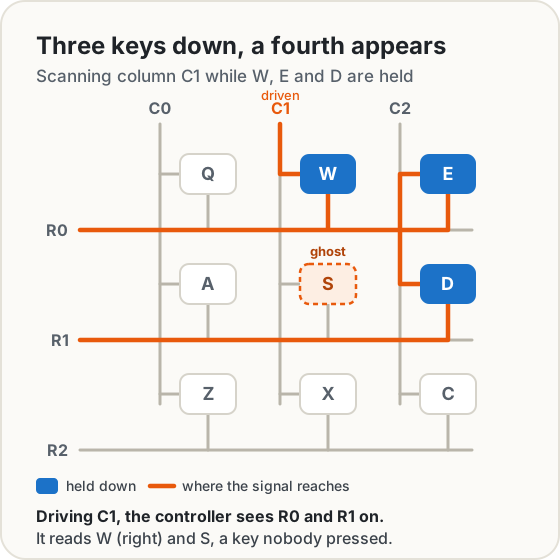
Hold three keys that sit on three corners of a rectangle in the grid, like W, E and D above. When the controller drives W's column, the signal goes through W onto its row, then backwards through E, which shares that row, onto E's column, then down through D onto D's row. The controller sees that row light up while it's driving W's column, and that's the position of S. So it reports S, a key nobody touched.
That's ghosting in the original sense. Texas Instruments' datasheet works through the same case, three keys that falsely trigger a fourth. Dave Dribin's classic explanation of key matrices adds the mirror image, masking: with those keys held, letting go of one of them may not register either, because the other closed switches still complete its circuit.
Here's where the word gets slippery. Microsoft's Applied Sciences Group used "ghosted" for the opposite symptom, the key that goes missing, because of what most keyboards do about the problem.
Two fixes: refuse, or add diodes
Refuse the ambiguous key. A keyboard can notice that the pattern could mean several different sets of keys and stop reporting new presses until it's clear. Microsoft says this is what the typical keyboard does. The USB keyboard specification allows for it too: a keyboard may report its error state "when an invalid or unrecognizable combination of keys is pressed". The phantom never appears, but your third key doesn't either. Makers also rearrange the wiring so common combinations sit on separate rows and columns, which, as Microsoft puts it, moves the problem to keys you're less likely to press together.
Add a diode to every key. A diode lets current through in one direction only, so the backwards step through E is blocked.
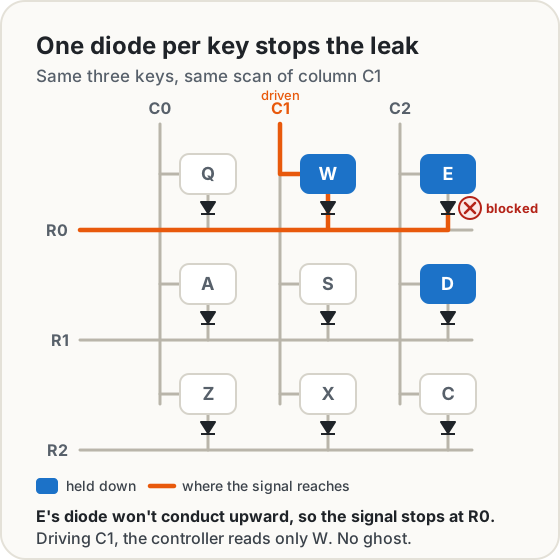
The QMK keyboard firmware documentation shows the same fix, with a diode between each switch and its row, and Dribin's write-up notes that diodes cure masking as well as ghosting. With a diode on every key, every combination reads correctly. The cost is parts: Microsoft called printing a circuit board with over a hundred diodes "relatively expensive".
2KRO, 6KRO and NKRO
Key rollover ratings say how many keys are guaranteed to register together, whichever keys they are.
| Rating | What's guaranteed | Where the limit usually comes from |
|---|---|---|
| 2KRO | Any two keys | A plain grid without diodes: two keys are always unambiguous, three may not be |
| 6KRO | Any six keys, plus the modifiers | The USB boot keyboard report (below) |
| NKRO | Every key at once | A diode per key, and a USB report with room for every key |
The word "guaranteed" matters. Microsoft notes that keyboards report as many keys as they can read without ambiguity, so a 2KRO keyboard can register three or more keys in combinations that don't share wires, just not in all of them. That's how one game can work fine and another trip over the same keyboard.
The USB limit: six keys
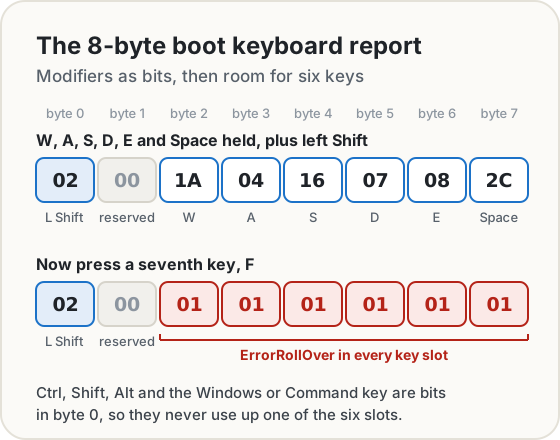
Even a keyboard with perfect wiring has to tell the computer what's pressed, and the USB HID specification (Device Class Definition for HID, version 1.11) defines a fixed "boot" format that a PC's firmware can read before Windows, macOS or Linux has loaded. Appendix B lays it out: 8 bytes, where byte 0 is the modifier keys as eight on/off bits (left and right Ctrl, Shift, Alt and the Windows or Command key), byte 1 is reserved, and bytes 2 to 7 are six slots for key codes. The codes come from the HID Usage Tables: W is 1A, A is 04, Space is 2C.
Six slots means six keys. Appendix C says what happens with a seventh: the keyboard must fill every slot with ErrorRollOver (code 01), "a phantom state", whenever more keys are pressed than the report can hold. It's six non-modifier keys with the standard boot format, and since modifiers are bits in byte 0, Shift, Ctrl and Alt never use up a slot.
The boot format exists for the firmware's sake. Appendix F explains that firmware in ROM can't carry a full HID driver, so the boot format is fixed in advance and the BIOS reads the 8-byte packets directly. Once the operating system's HID driver loads, it switches the keyboard to the report format described in the keyboard's own report descriptor, and Appendix C allows that format to differ. A bigger report is one way keyboards get past six keys. Microsoft's article describes it, along with the other way, sending several reports, and the catch: a custom format may not work before the operating system starts, so such a keyboard has to switch formats when it does.
Why gaming keyboards say "anti-ghosting" on the box
Games hold keys in combinations that typing never does. Microsoft's own example is running diagonally and firing at once: A, W and G together. On a keyboard that refuses ambiguous patterns, that can be the moment the shot doesn't fire.
So gaming keyboards advertise rollover, and Microsoft's group warned that the labels can mean less than they suggest. "Anti-ghosting" may only cover a set of keys, such as the ones around W, A, S and D. "Up to" some large number of keys can be true for a single combination while many three-key combinations still fail. Their own SideWinder X4 was specified precisely instead: any combination of 17 or fewer QWERTY keys, plus 7 modifiers, a hot key and a macro key, 26 in all.
The useful spec is a guarantee: "NKRO", or "6KRO", or "any N keys". Better still, test the combinations you use.
Test your keyboard
Open our Keyboard Test. Pick ANSI (US) or ISO (UK and most of Europe) to match your Enter key, then press every key: each one turns a soft colour once it has worked, and the log shows what the browser received. Then test rollover: hold keys down one after another and watch Most at once. When a key you add doesn't light up, that's your keyboard's limit for that combination.
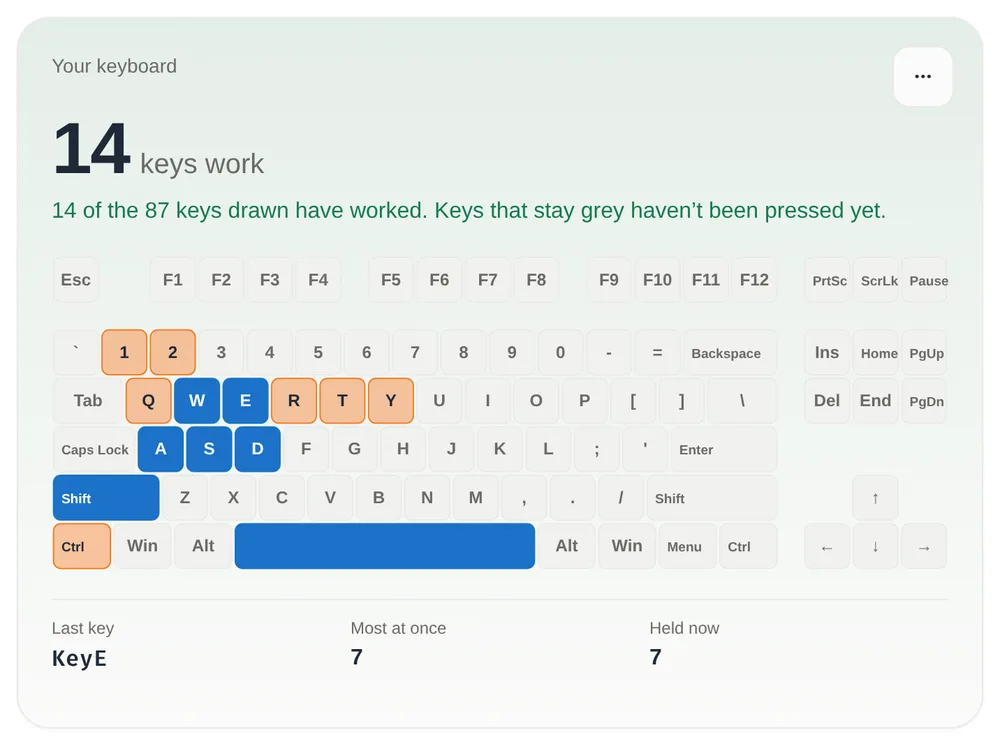
The screenshot holds exactly what a boot report can carry: six non-modifier keys (W, A, S, D, E and Space) plus Shift. A 6KRO keyboard stops there. Add a seventh key, like F, and it can't be reported.
A few things to know while testing. Try your real combinations, not random ones, since the limit depends on which keys share wires. Fn never lights up: most keyboards handle it themselves. And the system keeps some shortcuts, like Alt+Tab, before the page sees them. Nothing you type is sent anywhere: the page only listens for key events in that tab and keeps its log in memory.
What you can and can't fix
You can't change the rollover limit. It's built into the wiring and the keyboard's firmware. A different USB port or cable won't add keys. Some keyboards have a rollover or NKRO setting, so check the manual. Otherwise, the fix for a game is to rebind actions to keys that work together, which the test shows you.
Filter Keys or Sticky Keys may be on. Windows turns on Filter Keys if you hold the right Shift key for eight seconds, and Sticky Keys if you press Shift five times. Filter Keys makes the keyboard ignore brief or repeated keystrokes, so quick taps vanish. Under the hood it sets an acceptance delay ("SlowKeys") and a bounce rate ("BounceKeys"). Sticky Keys lets you press shortcuts one key at a time, so modifiers seem to stay down. Turn them off in Start > Settings > Accessibility > Keyboard. On a Mac, the same ideas are Slow Keys and Sticky Keys, under Apple menu > System Settings > Accessibility > Keyboard, and Sticky Keys can be set to toggle with five presses of Shift.
Dirt can block a key. Microsoft's first checks for a keyboard include making sure no dirt is blocking the keys, trying a different USB port, plugging in directly instead of through an unpowered hub, and fresh batteries for a wireless one.
A switch can chatter. A mechanical switch doesn't close cleanly: its contacts bounce for a moment, and firmware waits for them to settle before it believes a press. QMK's documentation calls this contact bounce, and its debounce time is the longest settling time the firmware allows for. A worn or dirty switch can bounce for longer than that and type a letter twice. In the Keyboard Test, that shows up as two lines in the log for one press. Cleaning sometimes cures it. Otherwise the switch, or the keyboard, needs replacing.
The ASCII table shows the character codes behind the keys you've just tested, if you want to go one layer further.
Sources
- USB Implementers Forum. Device Class Definition for Human Interface Devices (HID), version 1.11: section 8.3 (the modifier byte), Appendix B (boot report), Appendix C (keyboard implementation, ErrorRollOver) and Appendix F (boot keyboard requirements).
- USB Implementers Forum. HID Usage Tables, version 1.6: Keyboard/Keypad page (key codes, ErrorRollOver).
- Texas Instruments. TCA8418 I²C-controlled keypad scan IC datasheet, section 9.1.1, "Ghosting Considerations".
- Microsoft Applied Sciences Group. Keyboard Ghosting Explained (archived copy).
- QMK Firmware. How a Keyboard Matrix Works and Contact bounce / contact chatter.
- Dave Dribin. Keyboard Matrix Help (ghosting and masking).
- Microsoft Support. Windows keyboard shortcuts for accessibility, Make your mouse, keyboard, and other input devices easier to use and Mouse and keyboard problems in Windows.
- Microsoft Learn. FILTERKEYS structure.
- Apple Support. Change Keyboard settings for accessibility on Mac.
Share this post
Keep reading
Computing· Oct 14, 2026· 10 min
Does Your Photo Show Where You Live? Check and Remove It
Phone photos can carry GPS coordinates accurate to a few metres. See what yours give away, which apps strip it, and how to remove it before you share.Computing· Oct 14, 2026· 11 min
How to Sign a PDF Without Uploading It
Sign a PDF in your browser with nothing uploaded: is an e-signature legal, how it differs from a digital signature, and when to use an e-sign service instead.Computing· Oct 11, 2026· 9 min
How to Compare Two Documents and See Every Change
Compare two versions of a contract, essay or code and see every change by line, word or letter, side by side or as track changes, without uploading anything.