How to Make a Table in Markdown: Alignment, Pipes and Limits
Copy a working Markdown table, align columns with colons, escape pipes, add line breaks in cells, convert CSV, and see what GFM tables can't do.
Computing··13 min read
A Markdown table is a header row, a row of hyphens, then your data, with a pipe (|) between cells. Copy this and change the words:
| Name  | Role     | Joined |
| ----- | -------- | -----: |
| Priya | Engineer |   2021 |
| Tom   | Designer |   2024 |
Leave a blank line before it, use three hyphens per column, and add colons to the hyphens to align a column: :--- for left, :---: for centre, ---: for right. That's the whole syntax. The rest of this guide is the details that make a table silently turn into a paragraph of pipes, and what to do when a plain table isn't enough.
Tables aren't part of core CommonMark. They come from GitHub Flavored Markdown (GFM), which adds them as an extension, so the GFM spec's tables section (version 0.29-gfm) is the reference here, along with GitHub's own docs on tables. The example numbers below are the spec's.
The three rows
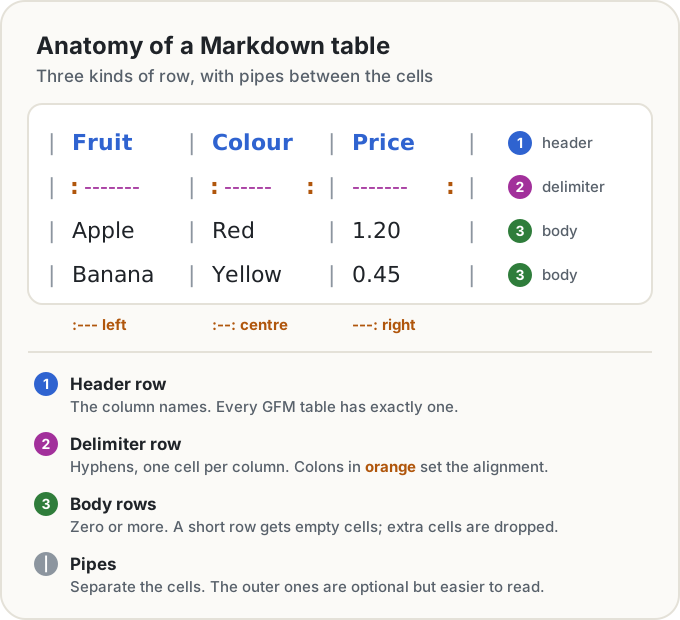
- The header row names the columns. GFM needs exactly one, and there's no way to leave it out.
- The delimiter row has one cell of hyphens per column. It must have the same number of cells as the header, or there's no table at all: the lines render as ordinary text full of pipes (example 203). When a table "doesn't work", this is usually why.
- The body rows hold the data, and there can be zero of them. They're allowed to be ragged: a row with too few cells gets empty ones, and extra cells are silently dropped (example 204).
A few rules that catch people out:
- Blank line first. GitHub's docs say the table needs a blank line before it to render.
- Three hyphens. The spec accepts a single hyphen (its own example 199 uses
:-:), but GitHub's docs ask for at least three per column. Write three and both are happy. - Blank line after. A table ends at a blank line or at the start of another block, like a quote or a heading. A plain line of text straight after the last row doesn't end it: it becomes one more row (example 202).
- Neat columns are optional. Spaces around each cell's content are trimmed, so lining up the pipes is only for people reading the source. The outer pipes are optional too, though the spec recommends them for clarity.
a | bon one line with---|---under it is a valid table.
Aligning columns with colons
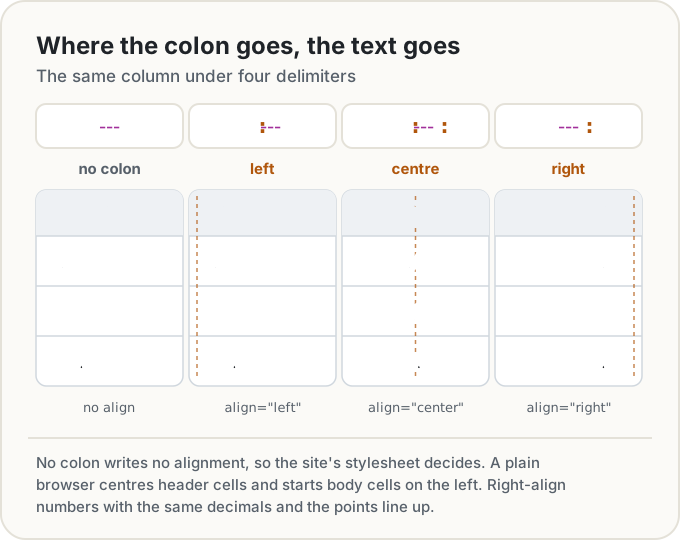
The colons in the delimiter row set each column's alignment. Where the colon goes, the text goes:
| Delimiter | Alignment | What the HTML gets |
|---|---|---|
--- |
None set | No align attribute |
:--- |
Left | align="left" |
:---: |
Centre | align="center" |
---: |
Right | align="right" |
Alignment belongs to the whole column, header included (example 199). There's no way to align a single cell.
With no colon, the renderer writes no alignment, and the site's stylesheet decides. A plain browser stylesheet centres header cells and starts body cells on the left, as the HTML Standard's rendering rules ask, so the same table can look slightly different on two sites. If the look matters, set it.
A good default: right-align numbers, and give them the same number of decimals, so the decimal points line up and you can compare sizes at a glance. Leave text on the left. Centre suits short markers like Yes, No or ✓, and not much else.
Escaping pipes
A pipe always means "next cell", so a literal one needs a backslash in front: \|. That's true inside inline code as well, which surprises people, because a backslash is normally literal between backticks:
| Operator   | Meaning     |
| ---------- | ----------- |
| `a \|\| b` | Logical OR  |
| `x \| y`   | Bitwise OR  |
GFM splits the row into cells before it reads the code spans, so each \| comes out as a plain | (example 200). Without the backslashes, a || b would be cut apart at each pipe, and the spare cells dropped.
Any other punctuation can be backslash-escaped as usual: \* for a literal asterisk, \_ for an underscore. The backslash escapes rule covers every ASCII punctuation character.
Formatting inside cells
Each cell is parsed for inline Markdown, so bold, italics, code, links, images and strikethrough all work:
| Shortcut       | Does                                  |
| -------------- | ------------------------------------- |
| `Ctrl` + `B`   | Makes the selection **bold**          |
| `Ctrl` + `K`   | Adds a [link](https://example.com)    |
| `Ctrl` + `I`   | Makes it *italic*                     |
Blocks are a different story. In the spec's words, "Block-level elements cannot be inserted in a table." That rules out lists, headings, code blocks, quotes and second paragraphs inside a cell.
Line breaks inside a cell
A row is one line of source, so pressing Enter inside a cell starts a new row. The usual fix is an HTML <br> tag, which works because Markdown allows raw inline HTML and <br> isn't on GFM's short list of disallowed tags:
| Day    | Plan                               |
| ------ | ---------------------------------- |
| Monday | Gym at 7<br>Standup at 9:30        |
| Friday | • Pack bags<br>• Train at 18:05    |
The second row fakes a list with bullet characters, which is as close as a GFM cell gets to one.
One caution: not every site renders raw HTML. Some drop it for safety, and this blog is one of them, which is why these examples sit in code blocks instead of rendering. Check the table where it'll actually be read.
What GFM tables can't do
- Merged cells. There's no colspan or rowspan. Repeat the value, leave the cell empty, or write an HTML
<table>withcolspanandrowspan, which Markdown lets you include as an HTML block. Whether those attributes survive depends on the site's sanitiser, so preview it. - Multi-line cells. Only
<br>, as above. No real paragraphs or lists. - A table without a header. The header is required. The nearest thing is a header of empty cells, which Pandoc's manual suggests for exactly this, though the result still has a header row, just an empty one.
- Column widths and captions. Widths come from the content and the stylesheet; the GFM spec gives the number of hyphens no meaning. Pandoc is the exception: when a pipe table has a line wider than its column setting, the hyphen counts set relative widths, so
---|-gives the first column 3/4 of the page.
If you write for Pandoc and need more, its grid tables can hold lists and paragraphs and span rows and columns. They're not part of GFM, though, so GitHub won't draw them as tables.
Turning CSV or a spreadsheet into a Markdown table
For a few rows, typing is quickest. For anything longer, convert.
With Pandoc, which reads CSV and TSV and writes GFM:
pandoc -f csv -t gfm prices.csv
It handles quoted commas and escapes pipes for you, so a cell holding Tea | green comes out as Tea \| green. If a cell holds a line break, it writes an HTML <table> instead, since a pipe table can't hold one. (We checked both with Pandoc 3.11.)
From a spreadsheet, copy the cells. The plain text a spreadsheet puts on the clipboard has a tab between cells, so pipe it into Pandoc as TSV:
pbpaste | pandoc -f tsv -t gfm                        # macOS
xclip -o -selection clipboard | pandoc -f tsv -t gfm  # Linux with xclip
Without installing anything, save the sheet as CSV and use Import CSV in our Markdown Editor's database block, described below. It reads the file in your browser, and the page's Markdown view then has the result as a plain GFM table you can copy.
Whichever route you take, tidy the sheet first: one header row (not two stacked ones), no merged cells and no empty spacer columns. Markdown has nowhere to put them.
Keeping wide tables readable
- Ask which columns the reader compares. Those stay; the rest can go in a second table or a note under it.
- Put long text in the last column. Short columns stay compact, and the long one wraps at the edge.
- Move units into the header. "Cost (€)" once beats a € in every cell.
- Turn it sideways. Many columns and few rows often read better transposed, with the old headers down the left.
- Split it. Two narrow tables that share a first column are easier than one wide one.
- Think twice before padding pipes in files you diff. Aligned columns read well in the source, but when one value gets longer, every row's padding changes, and the diff shows the whole table as edited. Paste the old and new versions into Text Compare and you'll see it.
When a table should be a small database
A Markdown table is static. To sort it by date, or show only the rows tagged Travel, you edit the text by hand. For a trip budget, a reading list or a small tracker, that gets old quickly.
Our Markdown Editor has a database block for this. Type /database on an empty line and you get a table with typed columns: text, number, date, checkbox, URL and select (coloured tags, one per row or several). On top of the table:
- Sort by clicking a column header: ascending, descending, then off.
- Search matches text in any cell.
- Filter shows only the rows with one chosen tag from a select column.
- Totals go under number columns: sum, average or count, worked out over the rows on screen.
- Rows move by dragging the handle, or with Alt and an arrow key, while the table isn't sorted.
- CSV in and out. Import reads comma, semicolon or tab separated files and guesses each column's type; Export downloads the table as CSV.
It holds up to 2,000 rows and 50 columns.
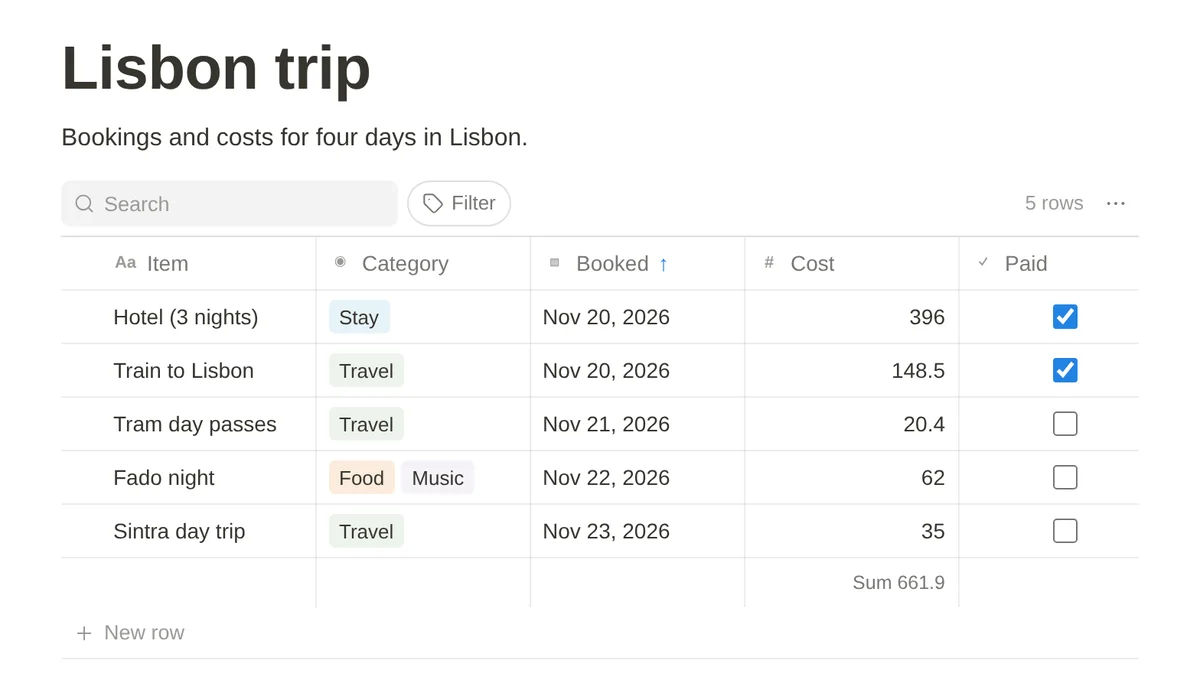
The page is still Markdown, though. The block is saved as an ordinary GFM table with one hidden HTML comment above it that holds the column types. This is the table in the screenshot, exactly as stored:
<!-- database {"columns":[{"type":"text"},{"type":"select","options":[{"name":"Stay","color":"blue"},{"name":"Travel","color":"green"},{"name":"Food","color":"orange"},{"name":"Music","color":"purple"}],"multi":true},{"type":"date"},{"type":"number","total":"sum"},{"type":"checkbox"}],"sort":{"column":2,"dir":"asc"}} -->

| Item | Category | Booked | Cost | Paid |
| --- | --- | --- | ---: | --- |
| Hotel (3 nights) | Stay | 2026-11-20 | 396 | Yes |
| Train to Lisbon | Travel | 2026-11-20 | 148.5 | Yes |
| Tram day passes | Travel | 2026-11-21 | 20.4 | No |
| Fado night | Food, Music | 2026-11-22 | 62 | No |
| Sintra day trip | Travel | 2026-11-23 | 35 | No |
On GitHub you see a normal table, because GitHub hides HTML comments in rendered Markdown, and a browser never displays one either. (An app that shows raw HTML as plain text would show the line; delete it before moving the table somewhere like that.) Our editor reads the comment and gets the database back. The table is the source of truth: the comment only holds each column's type, the tag colours, which total to show and the sort, matched to the columns by position. Values are stored in one plain form each. Number columns are right-aligned with ---:, dates are written as 2026-11-20, checkboxes as Yes or No, tags as Food, Music, and numbers without trailing zeros, so the 148.50 we typed is saved as 148.5. Cell text is escaped (pipes, asterisks, underscores and the like get a backslash) so it reads literally anywhere, and a line break inside a cell is saved as <br>.
It's the same block a Notion database becomes when you import a Notion export into the editor.
What it doesn't do: it's one table at a time, with no formulas, no relations between tables and one tag filter at a time. Because cell text is escaped, **bold** in a cell stays as typed. Importing a CSV replaces the block's table (Undo brings the old one back), and your pages are saved in this browser. If you need formulas or joins, use a spreadsheet. This is for lists that outgrew a plain table but don't need a spreadsheet.
The short version
- Header row, delimiter row of
---, then data rows, with a blank line before and after. - The header and delimiter rows need the same number of cells, or there's no table.
- Colons align a column:
:---left,:---:centre,---:right. Right-align numbers. - Write a literal pipe as
\|, inside backticks too. - Inline formatting works in cells; blocks don't. Use
<br>for a line break where raw HTML is allowed. - No merged cells and no headerless tables in GFM. Reach for HTML or Pandoc's grid tables.
- Convert CSV with
pandoc -f csv -t gfm, or import it into a database block when you want to sort and filter it.
Sources
- GitHub. GitHub Flavored Markdown Spec, version 0.29-gfm: 4.10 Tables (extension). The three rows, alignment colons, escaped pipes, where a table ends, ragged rows (examples 198 to 205); also backslash escapes and disallowed raw HTML.
- GitHub Docs. Organizing information with tables. The blank line before a table, at least three hyphens, formatting in cells. Also Basic writing and formatting syntax: hiding content with comments.
- CommonMark. CommonMark Spec 0.31.2: raw HTML and HTML blocks.
- WHATWG. HTML Standard, rendering: tables. The default centring of header cells.
- Pandoc. Pandoc User's Guide: pipe tables, grid tables and the CSV and TSV input formats.
Share this post
Keep reading
Computing· Oct 7, 2026· 11 min
Mermaid Flowcharts and Sequence Diagrams: A Practical Guide
Write Mermaid flowcharts and sequence diagrams that render first time: shapes, arrows, subgraphs, alt and loop blocks, and the errors that break them.Computing· Nov 4, 2026· 14 min
What Is AGENTS.md? How to Write One Your Coding Agent Follows
AGENTS.md is a Markdown file of instructions for AI coding agents. Where it goes, which agents read it, how it differs from CLAUDE.md, and an example.Computing· Oct 9, 2026· 12 min
Cron Syntax Explained, With Examples You'll Actually Use
Read any cron expression field by field, copy 14 everyday schedules (every 5 minutes, weekdays at 9), and avoid the traps that make jobs run at the wrong time.