Cron Syntax Explained, With Examples You'll Actually Use
Read any cron expression field by field, copy 14 everyday schedules (every 5 minutes, weekdays at 9), and avoid the traps that make jobs run at the wrong time.
Computing··12 min read
A cron expression is five fields separated by spaces: minute, hour, day of the month, month and day of the week. */5 * * * * runs every 5 minutes. 0 9 * * 1-5 runs at 9:00 every weekday. Once a minute the cron daemon checks the clock against every line, and starts each job whose five fields all match.
That really is most of it. What trips people up is the small print: one field combination that means "or" instead of "and", steps that restart every hour, and time zones. This post covers the syntax, gives you 14 schedules to copy, then walks through the five traps that make a job run at the wrong time (or not at all).
The five fields
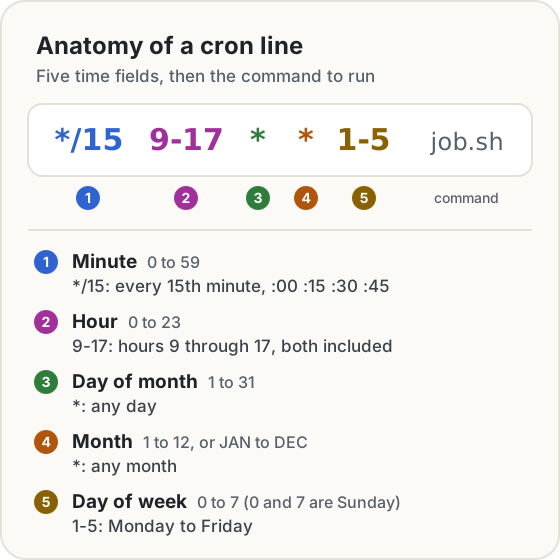
Each field has a fixed range, set out in the crontab(5) manual:
- Minute is 0 to 59 and hour is 0 to 23, on a 24-hour clock. There is no hour 24.
- Day of month is 1 to 31.
- Month is 1 to 12, or the first three letters of its name (
jan,JAN, case doesn't matter). - Day of week is 0 to 7, where both 0 and 7 mean Sunday, or names such as
mon.
Everything after the fifth field is the command, run by /bin/sh unless the crontab sets SHELL. One character there catches almost everyone once: %. Cron turns an unescaped % into a newline and sends the rest of the line to the command's standard input. So date +%F works in your terminal and silently breaks in a crontab. Write it date +\%F.
By default, whatever the job prints is mailed to the crontab's owner. Unless someone reads that mailbox, you'll never see an error, so send the output to a log file while you're testing: add >> /tmp/job.log 2>&1 to the end of the line.
The four special characters
| Character | Means | Example | Runs at |
|---|---|---|---|
* |
every value | * in the hour field |
every hour |
, |
a list | 0,30 in the minute field |
:00 and :30 |
- |
a range, both ends included | 9-17 in the hour field |
9:00 through 17:00 |
/ |
a step through a range | */15 in the minute field |
:00, :15, :30, :45 |
You can mix them: 0-30/10 is minutes 0, 10, 20 and 30, and 1-5,0 is weekdays plus Sunday. A step always counts from the start of its range, not from the moment you saved the file. Install */15 at 10:07 and it next runs at 10:15, not 10:22.
Linux cron also takes shortcuts in place of all five fields: @hourly, @daily, @weekly, @monthly, @yearly and @reboot. They're handy on a server, but GitHub Actions, AWS and Quartz don't accept them, so the five-field form travels better.
If you'd rather not decode a line by eye, paste it into our Cron Expression Generator. It reads the expression back in plain English, draws the week, and lists the next ten runs in any time zone you pick, with UTC beside each one. It runs in your browser, so nothing you paste is sent anywhere.
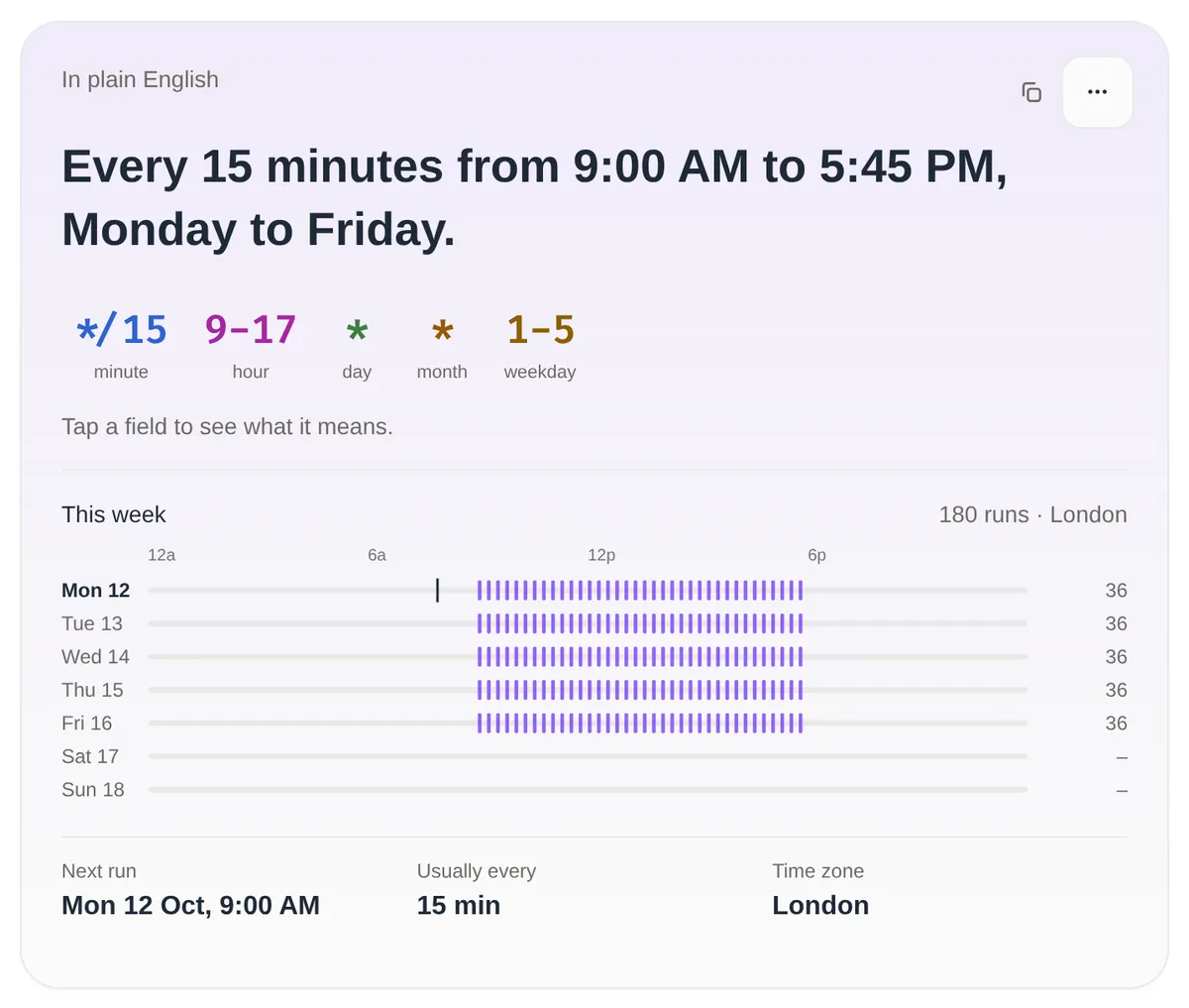
Notice the last run is 17:45, not 17:00. The hour field says "any minute matching */15 during hours 9 to 17", and 17:45 is still hour 17. If you want the last run at 17:00, use */15 9-16 * * 1-5 plus a second line, 0 17 * * 1-5.
14 schedules you'll actually use
Each expression links to a page in the generator that explains it and shows its next runs.
| Expression | Runs |
|---|---|
*/5 * * * * |
Every 5 minutes, 288 times a day |
*/15 * * * * |
Every 15 minutes: :00, :15, :30, :45 |
0 * * * * |
Every hour, on the hour |
0 */2 * * * |
Every 2 hours from midnight: 0:00, 2:00 … 22:00 |
0 0 * * * |
Every day at midnight (same as @daily) |
30 2 * * * |
Every day at 2:30 AM (see trap 3 before you use this one) |
0 9 * * 1-5 |
9:00 AM, Monday to Friday |
*/15 9-17 * * 1-5 |
Every 15 minutes in office hours, last run 17:45 |
0 9,17 * * * |
9:00 AM and 5:00 PM, every day |
0 10 * * 0,6 |
10:00 AM on Saturday and Sunday |
0 0 * * 0 |
Midnight every Sunday (same as @weekly) |
0 0 1 * * |
Midnight on the 1st of every month (@monthly) |
0 0 1 */3 * |
Quarterly: 1 January, April, July and October |
0 0 1 1 * |
Once a year, midnight on 1 January (@yearly) |
A habit worth picking up: if a job doesn't need to run on the hour, don't. 7 * * * * instead of 0 * * * * keeps it away from the moment every other hourly job on the machine (and on GitHub's runners, see trap 5) starts at once.
Trap 1: both day fields set means "or"
Say you want a report at 9:00 on the first Monday of the month. The obvious line is:
0 9 1-7 * 1
Days 1 to 7, and Monday: surely that's the first Monday? It isn't. The crontab(5) manual is explicit: when both day fields are restricted (neither is *), the command runs when either field matches. So this runs on every one of the first seven days, and on every Monday of the month as well.
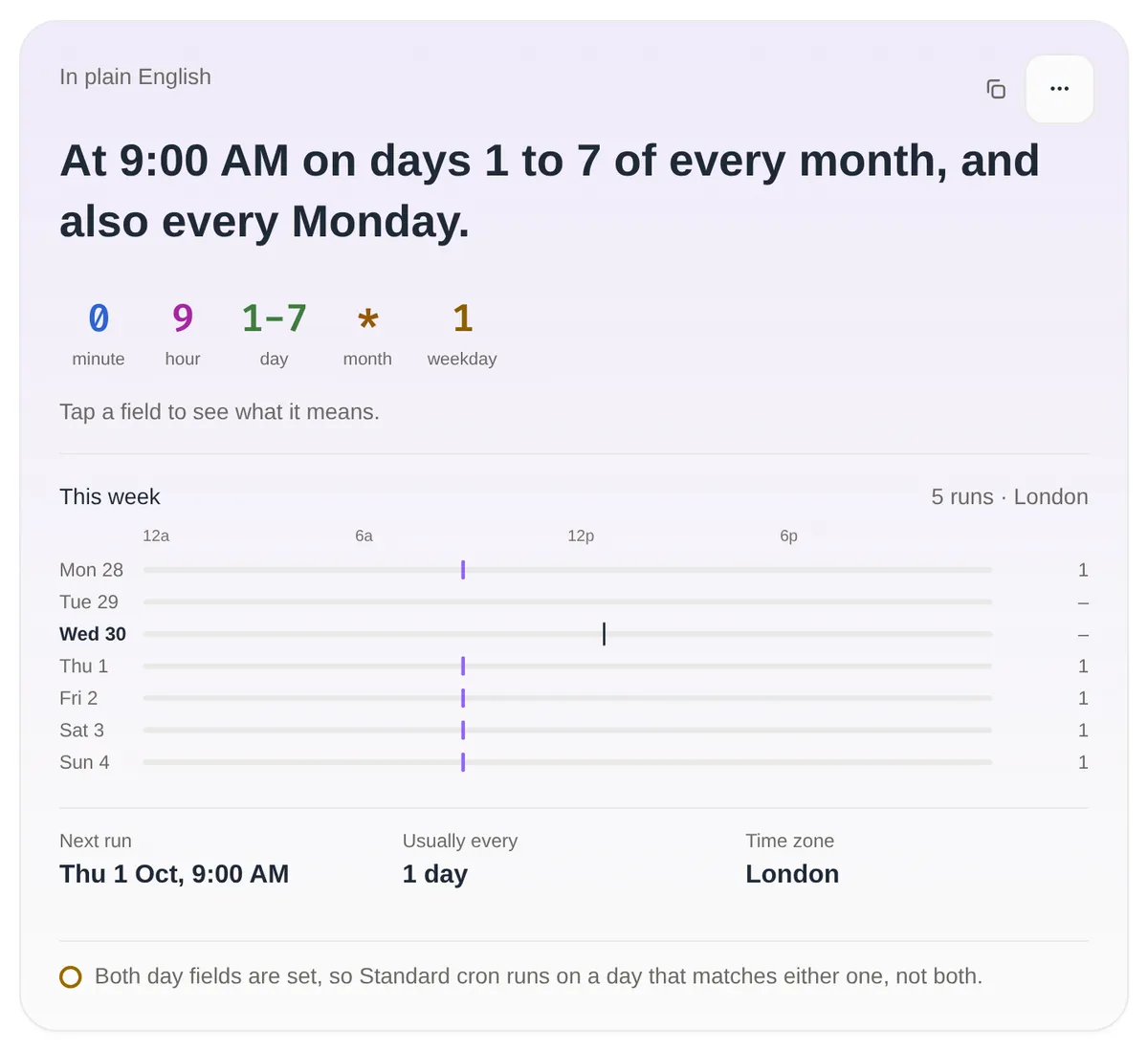
The generator's next-runs list for October says it all: the 1st, 2nd, 3rd, 4th, 5th, 6th and 7th, then the 12th, 19th and 26th. Ten runs instead of one. The fix on Linux is to let cron pick the first seven days and have the shell check the weekday:
0 9 1-7 * * [ "$(date +\%u)" = 1 ] && /usr/local/bin/report.sh
date +%u prints the day of the week as 1 to 7, with 1 for Monday, and the % is escaped for the reason above. Quartz and AWS EventBridge have a direct way to say it, MON#1 ("the first Monday"). They also sidestep the trap entirely: neither lets you set both day fields, so one of them has to be ?, meaning "no specific value". Our first Monday of the month page has the Quartz version.
Trap 2: */7 is not every 7 minutes
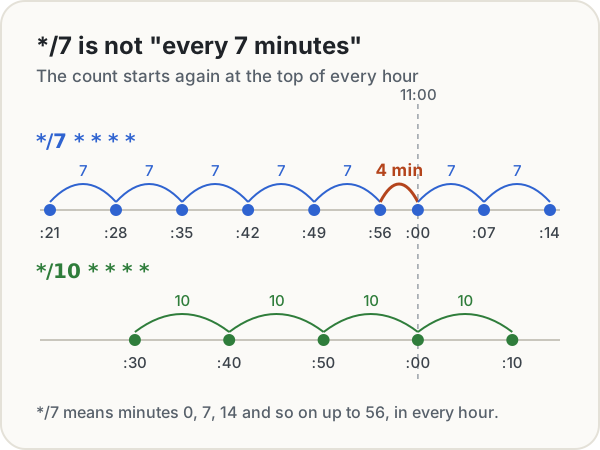
A step is evaluated inside its own field. */7 in the minute field means minutes 0, 7, 14, 21, 28, 35, 42, 49 and 56 of every hour. After :56 the next match is :00 of the next hour, four minutes later, not seven. The crontab manual puts it plainly: steps are evaluated just within the field they're applied to. Its own example is */23 in the hour field, which means hour 0 and hour 23, not every 23 hours.
The same thing happens with hours. 0 */5 * * * runs at 0:00, 5:00, 10:00, 15:00 and 20:00, then again at midnight, four hours after the last one.
So for even gaps, the step has to divide the field evenly: 1, 2, 3, 4, 5, 6, 10, 12, 15, 20 or 30 for minutes, and 1, 2, 3, 4, 6, 8 or 12 for hours. If you really need "every 7 minutes, forever", cron is the wrong tool. AWS EventBridge's rate(7 minutes) counts from when the schedule starts instead of from the clock, and on a plain server a loop with sleep does the job.
Trap 3: time zones and daylight saving
Linux cron reads its schedule in the system's local time zone. cronie, a common Linux cron and the one whose manual is quoted here, lets a crontab set CRON_TZ to use a different zone for its lines.
Local time is fine until the clocks change. On the night they go forward, an hour doesn't exist. On the night they go back, an hour happens twice. In the UK in 2026, clocks went forward at 1:00 AM on 29 March and go back at 2:00 AM on 25 October. Every scheduler handles this differently:
- cronie treats changes under three hours specially. When the clock jumps forward, jobs that would have run in the skipped time run straight away. When it goes back, it avoids running a job twice. But that only applies to jobs at a fixed time or that run less often than hourly. A
*/15job is "scheduled normally": it loses the runs in the missing hour, and runs twice through the repeated one. - AWS EventBridge Scheduler skips a run that falls on a time that doesn't exist, and runs only once in a repeated hour.
- GitHub Actions, when you set a time zone, moves a run in the skipped hour to the next valid time: 2:30 AM becomes 3:00 AM.
The safest choices are to run servers on UTC, or to keep daily jobs out of the 1:00 to 3:00 AM window when clocks change in your zone. UTC has its own catch: "9:00" no longer means 9:00 for your team, and the gap changes twice a year. In that October list, a 9:00 London run is 8:00 UTC until 25 October and 9:00 UTC from the 26th. Our Time Zone Converter shows the offset for any date, and the cron generator lists each run in both zones.
Trap 4: other schedulers don't use the same five fields
"Cron syntax" is really a family of dialects. The big differences are a seconds field, a year field, and how weekdays are numbered:
| Scheduler | Fields | Seconds? | Day of week | Notes |
|---|---|---|---|---|
| Linux cron | 5: minute to day of week | No | 0 to 7, Sunday is 0 or 7 | Both day fields set means "or" |
| Quartz (Java) | 6 or 7: second first, optional year last | Yes | 1 to 7, Sunday is 1 | ? required in one day field |
| AWS EventBridge | 6 inside cron(): minute first, year last |
No | 1 to 7, Sunday is 1 | ? required in one day field; can't go below 1 minute |
| GitHub Actions | 5, POSIX cron syntax | No | 0 to 6, Sunday is 0 | UTC unless you set timezone; every 5 minutes at most |
That day-numbering row is the nasty one. 1-5 means Monday to Friday in Linux cron, but Sunday to Thursday in Quartz and AWS. Names avoid the problem: MON-FRI means the same thing everywhere that accepts names.
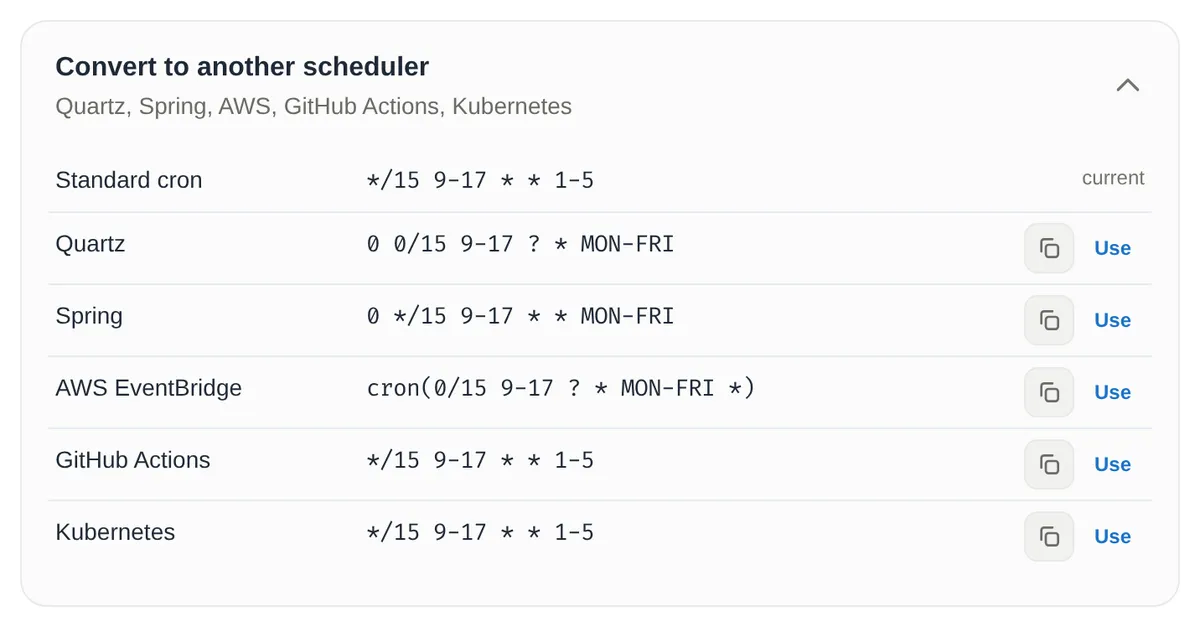
Pasting from one dialect into another can fail quietly. Put the six-field Spring line 0 */15 9-17 * * MON-FRI into a Linux crontab and it's accepted: cron reads the first five fields as minute 0, hours 0 and 15, days 9 to 17, and takes MON-FRI as the command to run. The generator converts between dialects and checks the result back against the original, which is what produced the table above.
Trap 5: GitHub Actions runs in UTC, and late
A scheduled GitHub workflow uses the same five fields, with three surprises:
-
It's UTC unless you say otherwise.
0 9 * * 1-5is 9:00 UTC, which is 10:00 in London from late March to late October. GitHub lets you add an IANA time zone next to the cron line:on: schedule: - cron: '17 9 * * 1-5' timezone: 'Europe/London' -
It can be late, or not run at all. GitHub's docs say scheduled runs can be delayed when Actions is busy, that the start of every hour is a busy time, and that under enough load some queued jobs may be dropped. The shortest interval is every 5 minutes. Pick an odd minute like :17, and don't schedule anything that has to happen at an exact time.
-
It only runs from the default branch, using the latest commit there. And in a public repository with no activity for 60 days, scheduled workflows are switched off automatically.
Before you save a crontab
Paste the line into the Cron Expression Generator, check that the sentence says what you meant, and read the next ten runs in the time zone the machine actually uses. It takes ten seconds, and it's a lot quicker than finding out from a missing report on the 2nd of next month.
Sources
- Linux man-pages project. crontab(5), cronie: fields, names, ranges, steps, the "either field" rule,
%,CRON_TZ,SHELLandMAILTO. - Linux man-pages project. cron(8), cronie: the minute-by-minute check and daylight saving handling.
- Linux man-pages project. date(1):
%u, day of week with 1 for Monday. - Quartz Scheduler. CronExpression, 2.3.0 API.
- Amazon Web Services. Schedule types in EventBridge Scheduler and Scheduled rules (legacy).
- GitHub Docs. Events that trigger workflows: schedule.
- GOV.UK. When do the clocks change?
Share this post
Keep reading
Computing· Oct 8, 2026· 7 min
Permission Denied in Linux: How to Read ls -l and Use chmod
Why a script says Permission denied, how to read the rwx columns in ls -l, and how to fix it with chmod u+x or numeric modes such as 755 and 644.Computing· Jul 18, 2026· 2 min
DORA Metrics Explained: The Four Keys to Delivery Performance
Deployment frequency, lead time, change failure rate and time to restore: what the four DORA metrics measure, how to read them and improve them honestly.Computing· Oct 7, 2026· 9 min
Common JSON Errors and How to Fix Each One
Trailing commas, single quotes, comments, NaN, escaped strings and big numbers that change: why JSON rejects each one, and the fix that works.