Do ATS Reject Resumes? The 75% and 6-Second Myths
Do applicant tracking systems really reject 75% of resumes, and do recruiters look for 6 seconds? Where both numbers came from and what the evidence says.
Productivity··11 min read
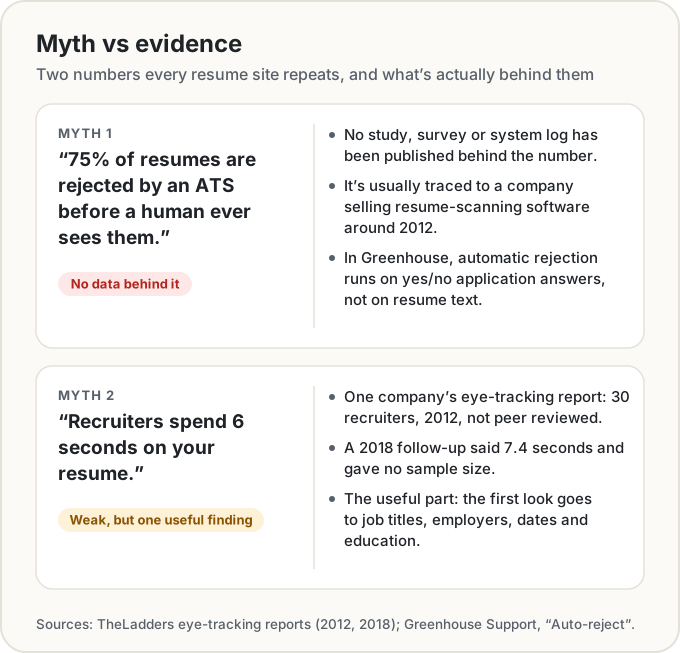
No, there's no evidence that applicant tracking systems throw out 75% of resumes before a person sees them. We looked for the data behind that number and couldn't find any. When an ATS rejects someone automatically, it's usually because of an answer to an application question the employer set up, not because software read the resume and disliked it. And the famous "recruiters spend 6 seconds on your resume" comes from one company's eye-tracking report with 30 recruiters.
That doesn't mean the software doesn't matter. Recruiters search their ATS with exact keywords, and employers do filter on rigid criteria. Here's where both myths came from, what an ATS actually does, and what's worth changing on your resume.
Where the "75% rejected by ATS" claim came from
You've probably seen it on resume sites. TopResume's review page says "75% of job applications are rejected before they are seen by human eyes", with no source (TopResume). A 2025 post on Jobscan's blog says over 75% of resumes are rejected by ATS "according to Forbes", pointing at a 2021 contributor article (Jobscan).
The usual origin story goes back further, to Preptel, a company that sold resume-optimisation software around 2012. Its archived homepage invited job seekers to "see how the hiring company will evaluate your resume" (Preptel, 2012, Internet Archive). We couldn't find a page from Preptel, or from anyone else, that ties the 75% to a study, a survey or a system log. No sample, no method, no year of data. A company with software to sell is the most likely source, and the number has been copied from site to site ever since.
The evidence we could find points the other way:
- Jobscan's own ATS guide, from the same company whose blog repeats the 75%, says: "Contrary to popular belief, an ATS rarely 'rejects' a candidate automatically. Instead, it acts as a search engine for recruiters" (Jobscan, April 2026).
- Enhancv, another resume-tool company, asked 25 recruiters. 23 of them (92%) said their systems don't auto-reject resumes for formatting, content or design (Enhancv). Twenty-five people is a small sample, and Enhancv sells resume tools too, but it's the only count we found, and it doesn't point to 75%.
What an ATS actually does
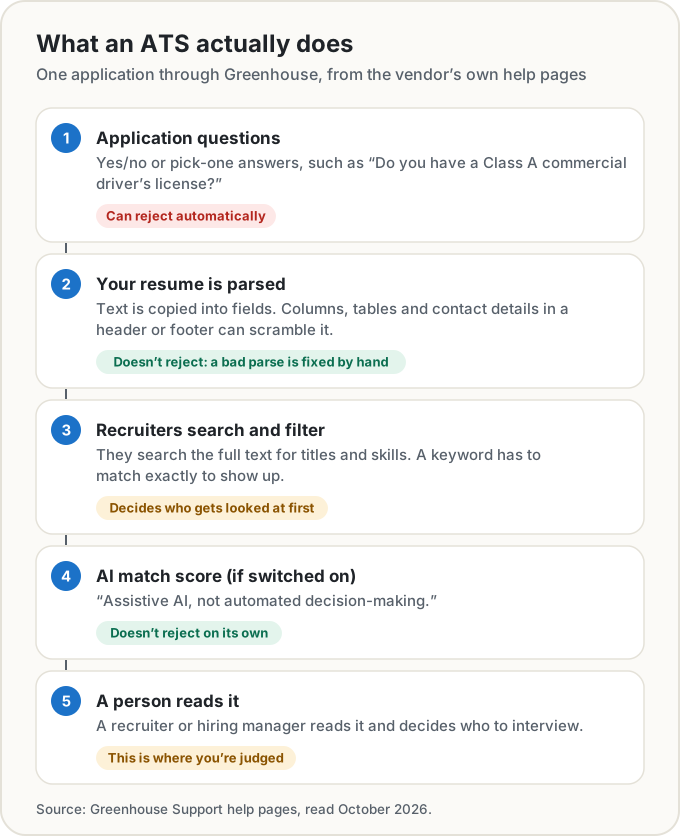
Most ATS vendors keep their manuals behind a login, but Greenhouse, one of the big ones, publishes its help pages. They describe four things that happen to an application, and only one of them is an automatic "no".
Knockout questions can reject you automatically. Greenhouse's auto-reject works "based on an applicant's answer to a question", and only on yes/no, single-select and multi-select questions. Its own example: "Do you have a Class A Commercial Driver's License?" (Greenhouse, Auto-reject). That's the employer drawing a hard line on the application form. Your resume's fonts have nothing to do with it.
Your resume gets parsed, sometimes badly. The system copies your details into fields. Greenhouse lists what trips it up: columns, tables, text boxes, headers and footers, contact details in the header or footer, graphics, resumes uploaded as images, no clear sections, letters spaced apart, and shortened job titles like "Sr. Account Exec" (Greenhouse, Unsuccessful resume parse). A bad parse doesn't reject you. The help page says the details then need to be entered or corrected by hand. Whether a busy recruiter bothers is another question.
Recruiters search, and the match has to be exact. Recruiters can search the full text of resumes for job titles, skills and other keywords. Greenhouse is blunt about it: "To appear in your results, the keyword from your search must exactly match the keyword in the application" (Greenhouse, Talent Filtering). If the posting says "Salesforce" and your resume says "CRM", a search for Salesforce won't find you.
AI match scores, if the employer turns them on, don't decide. Greenhouse calls its Talent Matching "assistive AI, not automated-decision-making. It does not automatically advance or reject candidates" (Greenhouse, Talent Matching).
That's one vendor, and every employer configures it differently. Other systems may work differently, and we couldn't read the manuals for most of them. But it's the clearest public description we found, and it looks nothing like a robot binning three quarters of the pile.
The "6-second scan": what TheLadders actually measured
In 2012 TheLadders, a job site that also sells resume rewriting, ran an eye-tracking study. "Thirty professional recruiters took part in the study during a 10-week period", and it found that recruiters "spend only 6 seconds reviewing an individual resume" (TheLadders, 2012, Internet Archive). It was partly testing recruiters' own claims of spending 4 to 5 minutes per resume.
In 2018 they updated it. The new figure was 7.4 seconds for "the average initial screen", from a two-stage study where recruiters didn't know they were being timed (TheLadders, 2018). The report doesn't say how many recruiters took part.
So how much weight can it carry? Not a lot. It's a company report, not peer reviewed, with 30 people in the first round and no published sample in the second. The 2012 version ends with a pitch for the company's resume-writing service. And 6 seconds was the first screen, not the time anyone spends before deciding to hire you.
There's a useful finding in there, though, and it's the part people skip. In 2012, recruiters spent almost 80% of their time on six things: your name, your current title and company, your previous title and company, the start and end dates of both jobs, and your education. The 2018 report adds that they "spent more time focusing on job titles than on any other element", did best with layouts that pair bold job titles with bulleted accomplishments, and that the worst resumes had "multiple columns, and very little white space" and "evidence of keyword stuffing".
Forget the stopwatch. The lesson is that your titles, employers, dates and education need to be findable at a glance.
The finding that should actually worry you
If you want a statistic about filtering that comes with a method, look at Hidden Workers, from Harvard Business School's Project on Managing the Future of Work and Accenture. It surveyed more than 8,000 workers and more than 2,250 executives in the US, UK and Germany (Fuller et al., 2021).
More than 90% of employers said they use their recruiting systems to filter or rank candidates first (94% for middle-skills roles, 92% for high-skills ones). And 88% agreed that qualified high-skills candidates get "vetted out of the process because they do not match the exact criteria established by the job description". For middle-skills workers that rose to 94%.
Some of those criteria are blunt. Almost half the companies surveyed screened out resumes with a "work gap", and the report describes systems where a gap of more than six months means the resume "is automatically screened out" on that alone.
So automatic screening is real. It's just not a mysterious 75% filter judging your layout. It's employers writing rigid requirements (a degree, a certificate, a number of years, no gaps) and the software applying them. Note that this is employers describing their own systems in a survey, not logs from the systems themselves.
What to actually do
None of this needs a trick. It needs a resume that a parser can read, a search can find and a person can skim.
- Keep the layout plain. One column, real section headings (Experience, Education, Skills), contact details in the body rather than the page header, and no tables, text boxes or images holding text. MIT's career office says either .docx or .pdf is "usually fairly safe" (MIT CAPD). If the posting asks for one, send that.
- Write job titles in full. "Senior Account Executive", not "Sr. Account Exec". Greenhouse names that exact example as a parsing problem.
- Use the job's own words, where they're true. If the posting says "customer success" and you did customer success, write "customer success", not "client happiness". Searches match exactly. For acronyms, write both once: "Project Management Professional (PMP)". Don't paste in a block of keywords, though. TheLadders flagged keyword stuffing on the worst resumes, and a person reads it in the end.
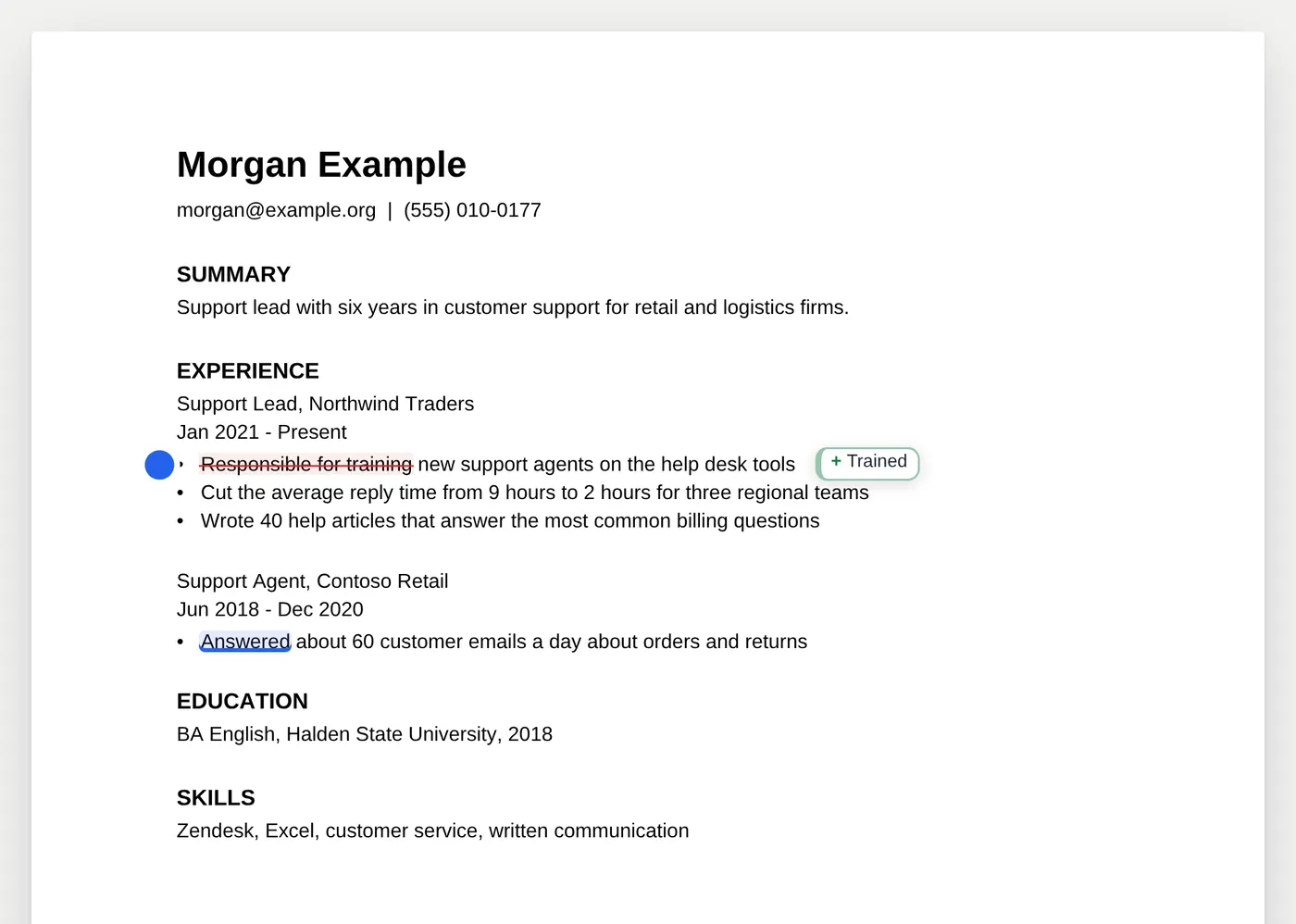
- Put numbers in your bullets. Harvard's career office says resume language should be "Fact-based (quantify and qualify)" (Harvard Mignone Center), and MIT's says "Quantify if you can" (MIT CAPD). "Cut the average reply time from 9 hours to 2" says more than "Responsible for reply times".
- Start bullets with what you did. Both guides recommend active verbs over passive phrasing. "Trained 12 new agents" beats "Responsible for training new agents".
- Answer the knockout questions honestly. They're the part that really can reject you on the spot, and they're about whether you meet a hard requirement. A better resume won't change that answer.
These are expert guidance from career offices, not measured effects. Nobody has published a trial showing that action verbs get you more callbacks. They're on this list because they make a resume easier to search and easier to skim, and those two things are well documented.
Checking yours
We built the Resume Checker around exactly these rules: the parsing problems from Greenhouse's docs, and the verb, number and clarity advice from Harvard and MIT. Open your PDF or Word file and it's shown as it looks, with each finding marked on your own words. Accept a fix and it shows as a tracked change, so you can see exactly what moved. Your file itself is never changed.
Paste a job posting and it lists the skills and terms the posting names, shows which ones your resume already uses, and gives a single "covers the job posting" figure. It also points out when the job title differs from yours.
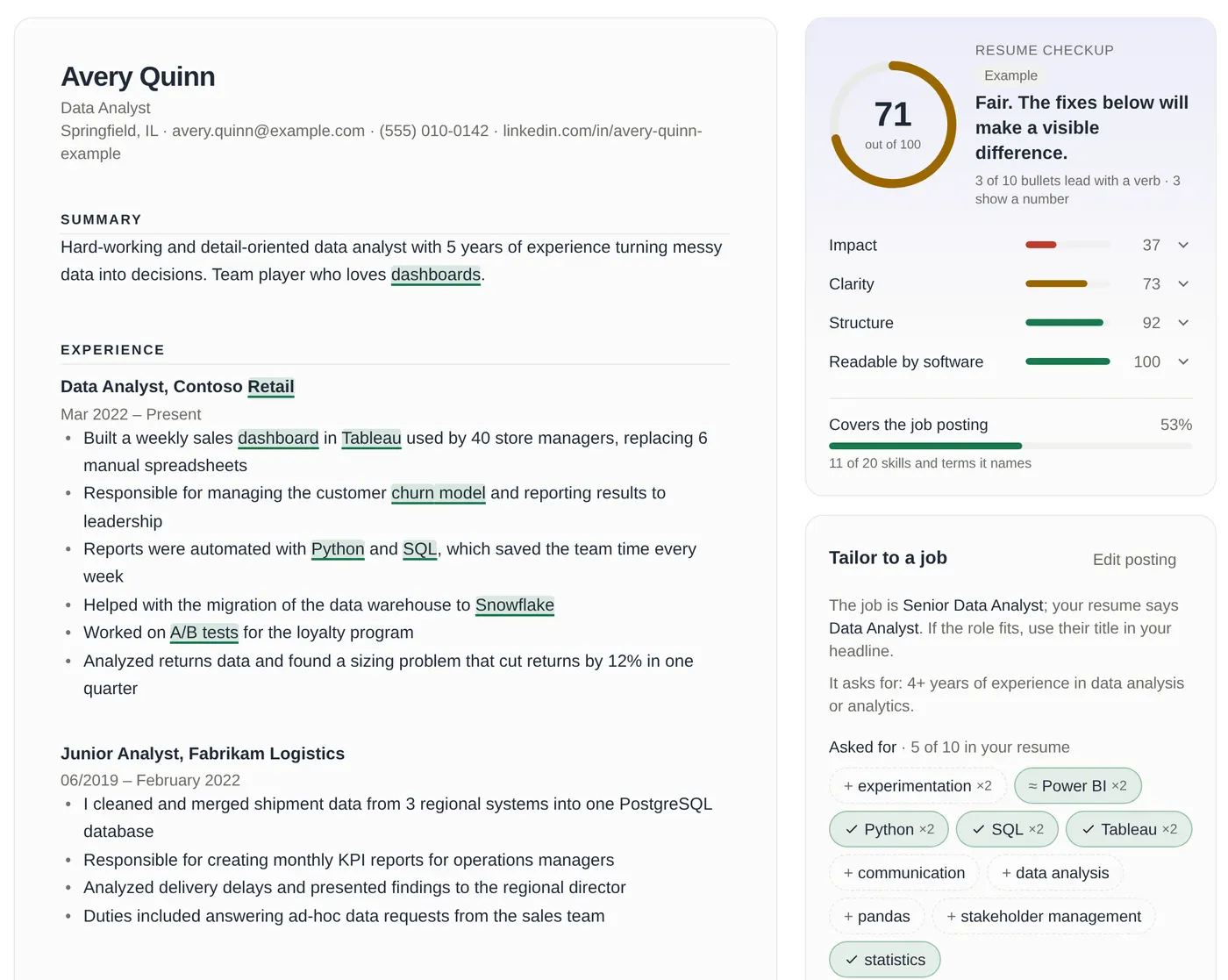
To be clear about what that score is: our own checklist, with weights we chose. No tool can know which knockout questions or filters a particular employer has switched on, so no tool can honestly predict an "ATS score". Everything runs in your browser. Nothing is uploaded unless you ask the optional AI for a rewrite, and even then your contact details stay behind.
Sources
- Greenhouse Support. Auto-reject; Unsuccessful resume parse; Talent Filtering; Talent Matching. Read October 2026.
- TheLadders (2012). Keeping an eye on recruiter behavior. Internet Archive copy. And the 2018 update at the same address on theladders.com.
- Fuller, J., Raman, M., Sage-Gavin, E., Hines, K., et al. (September 2021). Hidden Workers: Untapped Talent. Harvard Business School Project on Managing the Future of Work and Accenture. PDF.
- Jobscan. 8 things you need to know about applicant tracking systems (April 2026) and ATS tips for students (2025).
- Enhancv. Does the ATS reject your resume? 25 recruiters explain.
- TopResume. Free resume review.
- Preptel homepage, 2012. Internet Archive copy.
- MIT Career Advising & Professional Development. Make your resume ATS-friendly and Resumes.
- Harvard FAS Mignone Center for Career Success. Create a strong resume.
Greenhouse is a trademark of Greenhouse Software, Inc. Binary Decimal isn't affiliated with any company named here.
Share this post
Keep reading
Productivity· Oct 7, 2026· 8 min
PST, PDT and IST: How Time Zones and Daylight Saving Work
UTC offsets, why the US–India gap flips between 12½ and 13½ hours, the weeks the US and Europe disagree, IANA zone names, and when working hours overlap.Productivity· Oct 7, 2026· 8 min
Chess Clock Rules: Increment, Delay, Blitz and Rapid Explained
How chess clocks work: Fischer increment vs Bronstein vs simple delay, FIDE blitz, rapid and standard categories, and which time control to pick.Productivity· Oct 7, 2026· 10 min
Dyslexia-Friendly Fonts: What the Research Actually Says
OpenDyslexic, Lexend and Atkinson Hyperlegible checked against the studies, and why spacing and text size matter more than the font itself.