How to Time Block Your Week, and What the Research Says
Time blocking gives every task a slot on your calendar. A 20-minute weekly routine, how to pad estimates, and what the studies do and don't show.
Productivity··14 min read
Time blocking means giving each task a time on your calendar instead of leaving it on a list. "Write the report" becomes "Tuesday, 9 to 11: draft the results section." To plan a week this way, set aside 20 minutes once a week: list what has to happen, estimate each job and pad the estimate, put your hardest work into your best hours first, fit meetings and email around it, and leave some time empty. When a block slips, move it to a new slot rather than deleting it, and spend 10 minutes at the end of the week comparing what you planned with what happened.
The research behind it is real but indirect. There's strong evidence that deciding when you'll do something makes you more likely to do it, and that people underestimate their own work. As far as we can find, nobody has tested time blocking itself in a controlled trial.
The 20-minute weekly routine
Do this on Friday afternoon or first thing Monday, with your calendar open.
- Empty your head (3 minutes). Write down everything you want to get done this week, including anything left over from last week's plan.
- Pick what matters (2 minutes). Circle the three to five things that would make the week a success. Everything else fills the time that's left.
- Estimate, then pad (5 minutes). Break each big item into its steps and estimate those, then add a buffer. If you know how long similar work took last time, start from that number, not from how long it ought to take.
- Place the fixed things (2 minutes). Meetings, calls, the school run, the gym. These aren't negotiable, so they go in first.
- Put deep work in your best hours (4 minutes). Give your circled items blocks of 90 minutes to two hours, in the part of the day when you think best. For many people that's the morning, before email gets going.
- Batch the shallow work (2 minutes). Email, messages and admin go in two or three short blocks a day, not scattered between everything else.
- Leave buffer (2 minutes). Keep an hour or so a day empty. It will fill up with overruns and surprises, which is the point.
Here's what that can look like for a week built around one report, a new client and the usual meetings:
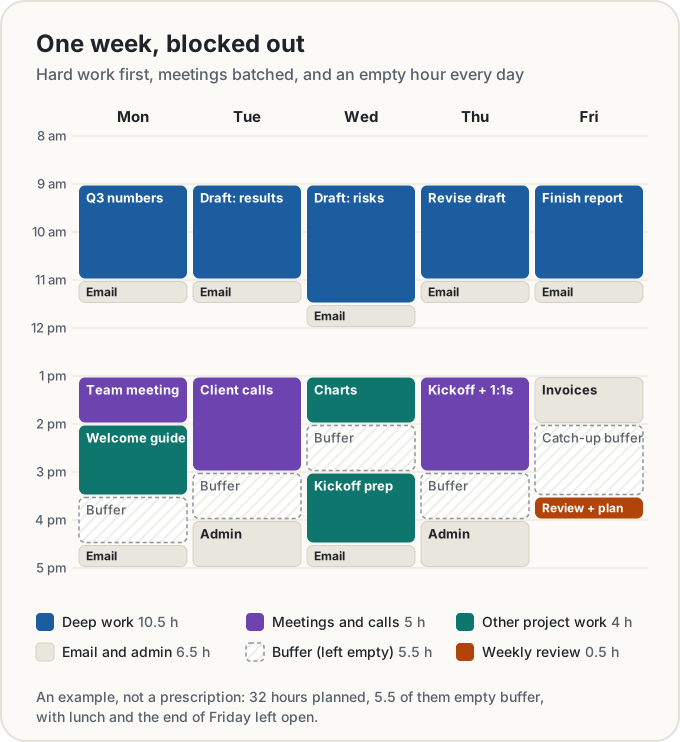
Notice what isn't blocked: lunch, the first hour of most days, and the end of Friday. A calendar packed to the minute breaks on the first phone call.
What the evidence says
Deciding when and where makes you more likely to act
The best support for time blocking comes from research on implementation intentions: plans of the form "when situation X arrives, I'll do Y." Peter Gollwitzer and Paschal Sheeran pooled 94 independent tests of them in a 2006 meta-analysis and found a medium-to-large effect on reaching goals (d = 0.65), over and above simply intending to.
A time block is an implementation intention with a calendar attached: "When it's 9 on Tuesday, I open the draft." It works outside the lab too. In a 2011 field experiment with 3,272 employees of a US utility, those whose flu-shot reminder asked them to write down a date and time got vaccinated at 37.1%, against 33.1% with the plain reminder. Modest, but from one line on a letter.
In lab studies, E. J. Masicampo and Roy Baumeister also found that unfinished goals keep pulling at your attention, and that making a specific plan for them removed that interference. Knowing the report has Tuesday morning may be what lets you stop thinking about it on Monday night.
Your estimates will be too short
The planning fallacy is the gap between how long we think our own work will take and how long it does. In the classic study, Roger Buehler, Dale Griffin and Michael Ross asked honours students at the University of Waterloo when they'd hand in their thesis (1994, Study 1).
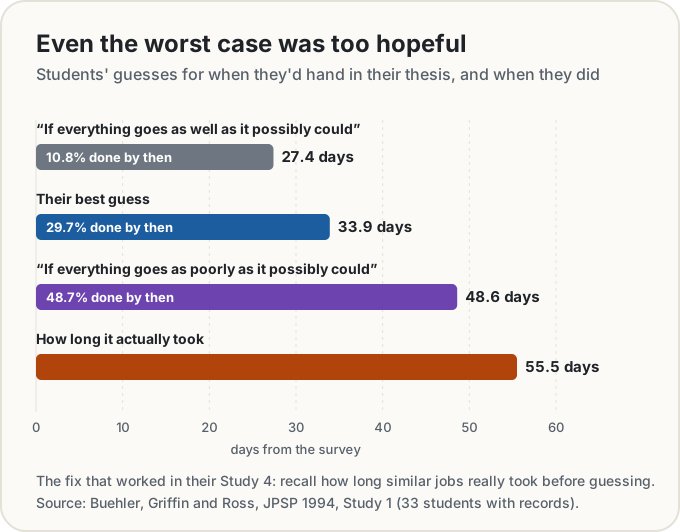
Their best guess averaged 33.9 days; the real figure was 55.5, and only 29.7% finished by the date they'd picked. Even their worst-case estimate came in a week short. The same paper found why: people imagined how the work would go and ignored how similar jobs had gone before. In a later study, asking people to connect past experience to the new prediction removed the optimistic bias.
Breaking work into parts helps too. Justin Kruger and Matt Evans found that people who listed a task's steps before estimating gave longer, less biased estimates. One caution from later studies on spending: unpacking makes estimates bigger, not necessarily better, so where you already estimate well, it can tip you into overestimating.
Switching has a cost
Lab studies of task switching consistently find that people are slower and make more mistakes just after changing tasks, even when they know the switch is coming (Monsell, 2003). Sophie Leroy added a twist in 2009: when people moved on from an unfinished task, part of their attention stayed behind (she called it attention residue) and they did worse on the next one. Finishing the first task wasn't enough to clear it; finishing it under time pressure was.
The best field evidence for protected blocks is Leslie Perlow's 1999 study of a software team at a Fortune 500 company. Three quarters of the engineers' uninterrupted stretches lasted an hour or less, yet only 10% of the interruptions were urgent. She introduced "quiet time": no interruptions until noon, three days a week. The share of engineers rating their productivity above average was 59% in the first quiet-time phase, 41% in a phase built around set interaction times instead, and 65% when quiet time came back. The division's vice president credited it with an on-time launch, only the second in the division's history. Once the study ended, old habits returned, and nine months later the effect was mostly gone.
Where the evidence is thin
- Time blocking itself hasn't been tested. The studies above test its pieces. No controlled trial we could find compares people who time block with people who don't.
- Time management is linked more to how people feel than to output. A 2021 meta-analysis of 158 studies and 53,957 people found time management moderately related to job performance (a correlation of about 0.25), a little more strongly to wellbeing, and to less distress (about −0.36). Most of those studies were correlational, so they can't show cause.
- Perlow's result was one team, measured by self-rating, and it faded once nobody defended the quiet hours.
- There's no research on theme days or on the best length for a deep-work block. Any precise number you read for either is opinion, including the 90 minutes to two hours suggested above.
Estimating with buffers
A common way for a first time-blocked week to fail: every block runs long and the plan collapses by Wednesday. Three habits help.
- Estimate the steps, not the job. "Draft the risks section" is three things: re-read the data, outline, write. Estimating each one surfaces the work you'd otherwise forget.
- Use your own ratio. After two or three weeks, compare planned with actual. If your blocks run 30% over, add 30% to the next estimates. That's the Buehler fix: start from what happened, not from what should happen.
- Leave empty time. Until you know your ratio, a reasonable starting point is about an hour a day unbooked. That's our rule of thumb, not a research finding. The sample week above keeps 5.5 of its 32 planned hours as buffer.
Theme days or time blocks?
Theme days give each day one kind of work: meetings on Tuesday, writing on Wednesday, admin on Friday. They cut switching across the week and suit people who control their own calendar. Time blocks work at the scale of hours, which suits people whose meetings are set by others.
You can mix them. The sample week uses theme afternoons: meetings on Monday, Tuesday and Thursday, project work on Wednesday, admin on Friday. No study says which is better, so pick whichever cuts more switches out of your week.
Protecting the deep-work blocks
- Book them first. Put next week's deep work on the calendar before anyone else's invitations arrive, and mark it busy in whatever calendar other people see.
- Close the doors. Turn off email and chat notifications for the block. Perlow's engineers judged most interruptions helpful, but 86% could have been put off to a planned time.
- Make them long enough to finish something. Leroy's work suggests that stopping halfway leaves residue. A block sized to complete a step ("draft the risks section") beats one sized to "work on the report."
- Use a timer inside the block. A focus timer or Pomodoro timer keeps the block honest and builds in breaks. Our guide to Pomodoro vs flexible breaks covers which suits which kind of work.
When a block slips: move it, don't delete it
Blocks will slip: a meeting runs over, a child is sick, a task turns out bigger than it looked. Deleting the missed block is the worst response, because the work hasn't gone anywhere. You've only hidden it.
Move it to the next free slot instead, ideally that day's buffer. If there's no room this week, put it back on your unplanned list so it's first in line next week. And if the same block has moved three times, that's information: the task is too big (split it), too vague (define the first step), or not important (drop it on purpose).
The end-of-week review
Ten minutes on Friday, before you plan next week:
- What got done? Tick it off. It's satisfying, and it's your record.
- What slipped, and why? An underestimate, an interruption, or a task you were avoiding?
- How far off were your estimates? This is your planning ratio for next week.
- What carries over? Those blocks go into next week first.
Then go straight into the 20-minute plan. The review is what turns time blocking from a calendar habit into a better guess every week, which is exactly what Buehler's students lacked.
Doing it in Workstreams
Workstreams is our free planner for this, built around the week and saved in your browser, with no account.
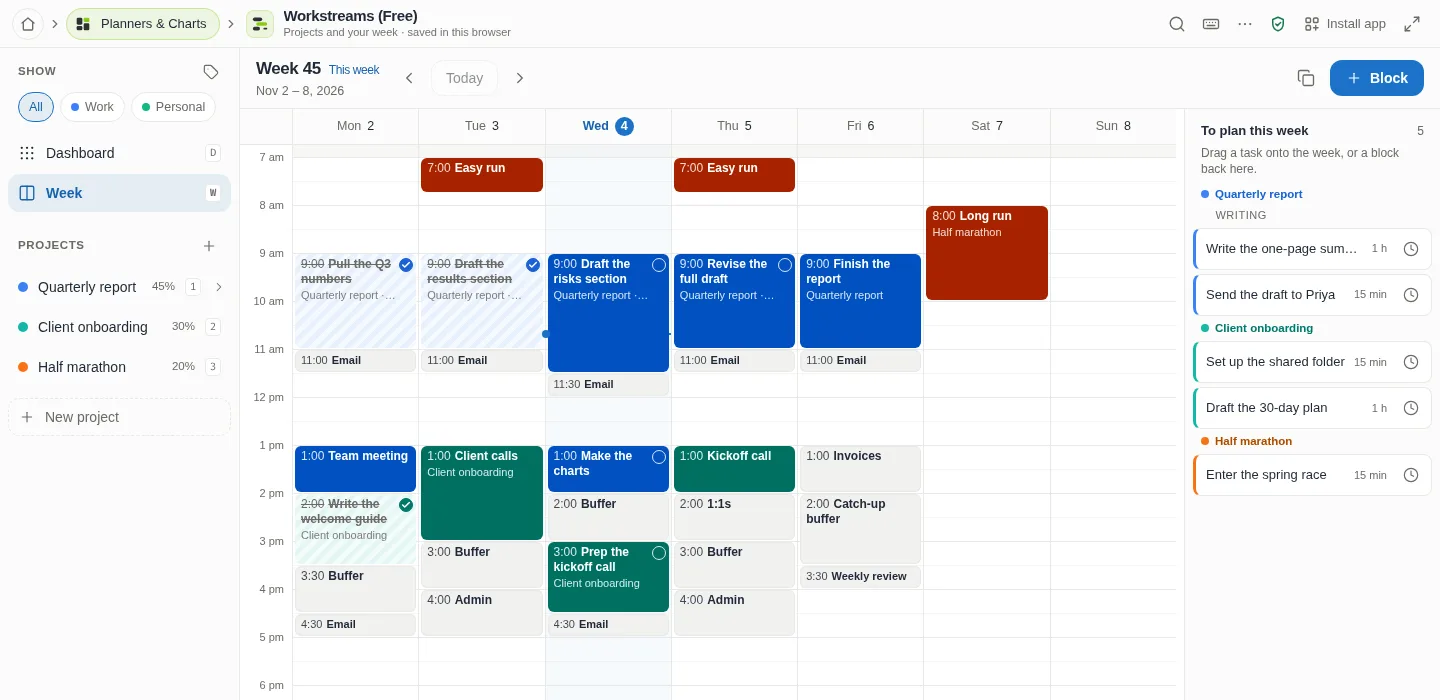
- Projects, streams and tasks. A project has a goal and "where I left off" notes; its tasks can be grouped into streams (such as Analysis and Writing), each with an estimate and a due date.
- The week, in 15-minute steps. Drag on empty space to draw a block, drag a block to move it (to another day too), and drag its top or bottom edge to resize it. The arrow keys do the same from the keyboard.
- "To plan this week." Every open task without time this week is listed beside the grid, grouped by project and stream, with its estimate. Drag one onto the week and it becomes a block as long as its estimate (up to four hours).
- Move, don't delete, built in. Drag a task's block back onto "To plan" and it's unscheduled: the block goes, and the task waits in the list for another slot.
- Done stays visible. Tick a block to mark its task done. It stays on the week, struck through: the record your Friday review needs.
- Start focus on a block for a timer sized to it, with the task's notes beside it.
- On a phone the week shows a day at a time: tap to add, move or schedule, and a block's sheet has Unschedule.
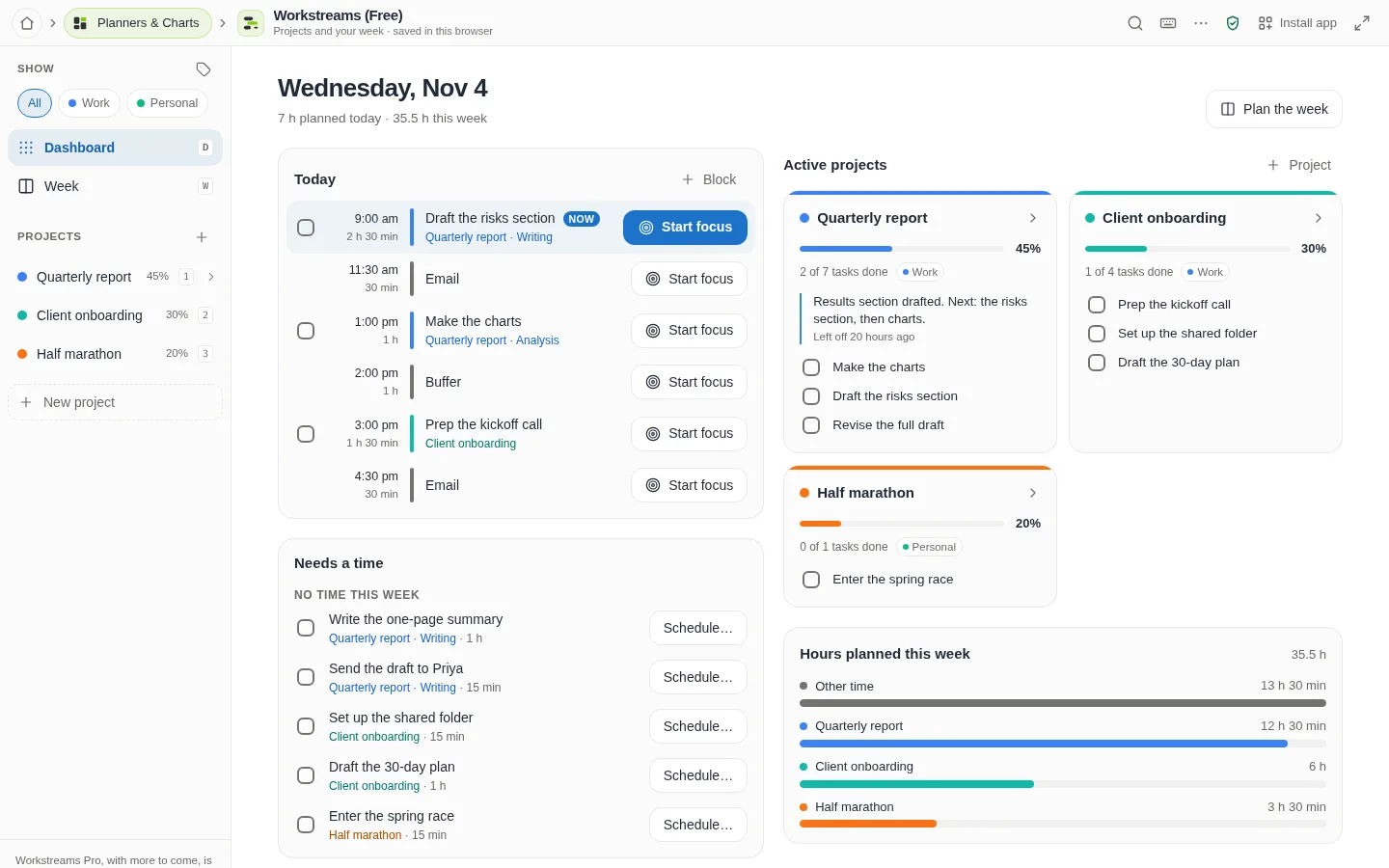
The dashboard adds up the hours planned for each project this week and lists the tasks that are overdue or still have no time, a ready-made checklist for step 4 of the review.
A few honest limits. Workstreams doesn't track how long you actually worked, so the planned-versus-actual comparison is yours to make (the struck-through blocks help). Ordinary blocks don't repeat: you draw each one, though a workout, meditation or practice can be planned as a habit that repeats on chosen weekdays for up to 12 weeks. There's no built-in weekly review screen yet. Two-way sync with Google Calendar is coming soon but isn't available today. For now, you can download your blocks as an .ics file and open it in Google Calendar, Apple Calendar or Outlook, or import another calendar's .ics file to see its busy times on your week.
The short version
- Plan the week in 20 minutes: pick what matters, pad the estimates, fixed things first, deep work in your best hours, leave buffer.
- The evidence is strong for the parts (planning when, underestimating, switching costs), but nobody has tested time blocking as a whole.
- When a block slips, move it. Three moves means split it, define it or drop it.
- Review every Friday, so next week's estimates start from what really happened.
Sources
- Gollwitzer, P. M., & Sheeran, P. (2006). Implementation intentions and goal achievement: A meta-analysis of effects and processes. Advances in Experimental Social Psychology, 38, 69–119.
- Milkman, K. L., Beshears, J., Choi, J. J., Laibson, D., & Madrian, B. C. (2011). Using implementation intentions prompts to enhance influenza vaccination rates. PNAS, 108(26), 10415–10420.
- Masicampo, E. J., & Baumeister, R. F. (2011). Consider it done! Plan making can eliminate the cognitive effects of unfulfilled goals. Journal of Personality and Social Psychology, 101(4), 667–683.
- Buehler, R., Griffin, D., & Ross, M. (1994). Exploring the "planning fallacy": Why people underestimate their task completion times. Journal of Personality and Social Psychology, 67(3), 366–381.
- Kruger, J., & Evans, M. (2004). If you don't want to be late, enumerate: Unpacking reduces the planning fallacy. Journal of Experimental Social Psychology, 40(5), 586–598.
- Peetz, J., Buehler, R., Koehler, D. J., & Moher, E. (2015). Bigger not better: Unpacking future expenses inflates spending predictions. Basic and Applied Social Psychology, 37(1), 19–30.
- Monsell, S. (2003). Task switching. Trends in Cognitive Sciences, 7(3), 134–140.
- Leroy, S. (2009). Why is it so hard to do my work? The challenge of attention residue when switching between work tasks. Organizational Behavior and Human Decision Processes, 109(2), 168–181.
- Perlow, L. A. (1999). The time famine: Toward a sociology of work time. Administrative Science Quarterly, 44(1), 57–81.
- Aeon, B., Faber, A., & Panaccio, A. (2021). Does time management work? A meta-analysis. PLOS ONE, 16(1), e0245066.
Share this post
Keep reading
Productivity· Oct 7, 2026· 9 min
Pomodoro vs Flowtime: What the Research on Breaks Says
Classic Pomodoro, Flowtime and a chess-clock break budget compared: what studies on breaks and attention found, and how to pick the one that suits you.Productivity· Oct 3, 2026· 6 min
How to Make a Vision Board You'll Actually Look At
A step-by-step guide to a vision board that changes what you do, not just how you feel, using what psychology research says about goals and plans.Productivity· Oct 3, 2026· 6 min
Vision Board Ideas for 2027: 60 Captions and 3 Real Examples
Sixty vision board ideas you can steal, grouped by life area, plus three real example boards and the small changes that make a board worth looking at every day.