How to Sign a PDF Without Uploading It
Sign a PDF in your browser with nothing uploaded: is an e-signature legal, how it differs from a digital signature, and when to use an e-sign service instead.
Computing··11 min read
To sign a PDF without uploading it, open it in a tool that runs on your own device, draw or type your signature, place it on the line and save a copy. Our PDF Reader & Annotator does that in the browser tab; on a Mac, Preview does it too. For most everyday paperwork (a freelance contract, a lease renewal, a school permission form) that's a valid electronic signature in the US, the EU and the UK.
What you get is a picture of your signature on the page. That's fine for a lot of documents and wrong for a few. Below: what the law says, how that picture differs from a "digital signature", what the big signing websites do with your file, and how to tell when you need one of them anyway.
Is a drawn signature on a PDF legally binding?
Usually, yes. Three sets of rules cover most readers.
United States. The federal ESIGN Act says a signature or contract "may not be denied legal effect, validity, or enforceability solely because it is in electronic form". Its definition of an electronic signature is broad: "an electronic sound, symbol, or process" attached to a record and adopted by a person "with the intent to sign". A typed name counts. So does a drawn squiggle. On top of that sits the Uniform Electronic Transactions Act (UETA), a model law written for states to adopt. It says the same thing and adds that if a law requires a signature, an electronic one satisfies it.
Two catches. Nobody has to accept an electronic signature: ESIGN doesn't require anyone to agree to use one, and UETA only applies when both sides have agreed to deal electronically. A landlord who asks for wet ink can insist on it. And some documents are carved out entirely. ESIGN doesn't cover wills, codicils and testamentary trusts, parts of the Uniform Commercial Code, adoption, divorce and other family law matters, court orders and filings, notices that cut off utilities, foreclosure or eviction notices, cancellations of health or life insurance, product recalls, and papers that travel with hazardous materials.
European Union. The eIDAS Regulation sets out three levels, and the difference matters.
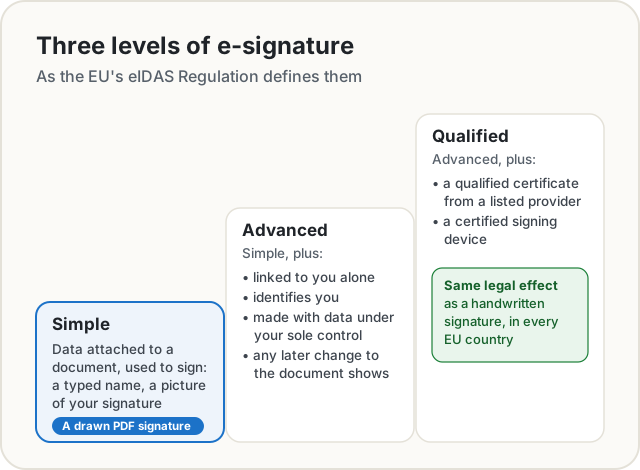
A drawn or typed signature is a simple electronic signature. Article 25 says it can't be refused as evidence just because it's electronic or because it isn't qualified. Only a qualified electronic signature automatically has "the equivalent legal effect of a handwritten signature", and that needs a qualified certificate from a qualified trust service provider. So a picture signature is admissible everywhere in the EU, but how much it proves is up to the court.
United Kingdom. The Electronic Communications Act 2000 makes electronic signatures admissible in evidence. In 2019 the Law Commission summed up the position: an electronic signature can be used to execute a document, even a deed, as long as the signer meant to authenticate it and any other formalities for that document are met.
None of this is legal advice for your situation. If the other party or a regulator names a method, use theirs.
Electronic signature or digital signature?
People use the two terms as if they meant the same thing. They don't.
An electronic signature is anything electronic you adopt to sign: a typed name, a ticked box, a drawn image. A digital signature is a specific kind of electronic signature built on cryptography. The signing software computes a fingerprint of the file's bytes and seals it with a private key tied to a certificate that names you. Change a single byte afterwards and PDF readers flag the signature as broken. That's the "any subsequent change in the data is detectable" requirement for an advanced signature in eIDAS, and the PDF version of it has its own European standard, PAdES.
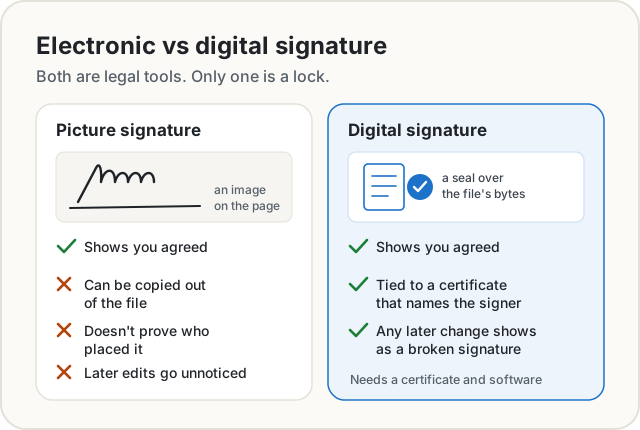
To be plain about ours: the PDF Reader & Annotator makes an electronic signature, not a certificate-based digital signature. It places a picture of your handwriting on the page, like signing a printout and scanning it. The signing window says so too.
What the signing websites do with your file
Most free "sign PDF" sites work by uploading your document, adding the signature on their server and sending a copy back. Here's what the big ones say about it, in their own words.
| Service | What happens to the file |
|---|---|
| Adobe Acrobat online (Fill & Sign) | "Your file will be uploaded to Acrobat web." You must sign in to finish, and the file is deleted unless you sign in to save it. |
| Smallpdf | Files are TLS-encrypted in transit and "automatically deleted after one hour" unless you save them to your account. |
| iLovePDF | Processed files are deleted within two hours. Signed documents are kept "for a maximum of 5 years in compliance with legal requirements". |
| Google Docs eSignature | The final PDF is saved to the requester's Drive, and a copy to each signer's My Drive, with an audit trail page listing names, emails and timestamps. Needs a paid Workspace plan. |
| Preview on a Mac | Works on the Mac itself. Signatures you create sync to your other Macs if you use iCloud Drive. |
None of that is sinister. Keeping a signed contract for years is the point of an e-signature service: it's the evidence. But it's worth knowing that the document you signed, often a contract with your address, salary or bank details, now lives on someone else's computer as well as yours.
Signing a PDF with our reader, step by step
The PDF Reader & Annotator opens the file inside your browser with pdf.js, the PDF engine Firefox uses. The file isn't sent anywhere, which is also why it keeps working with the Wi-Fi off once the page has loaded.
- Open the reader and drop your PDF on it, or tap Open.
- Choose Signature in the toolbar (or press S).
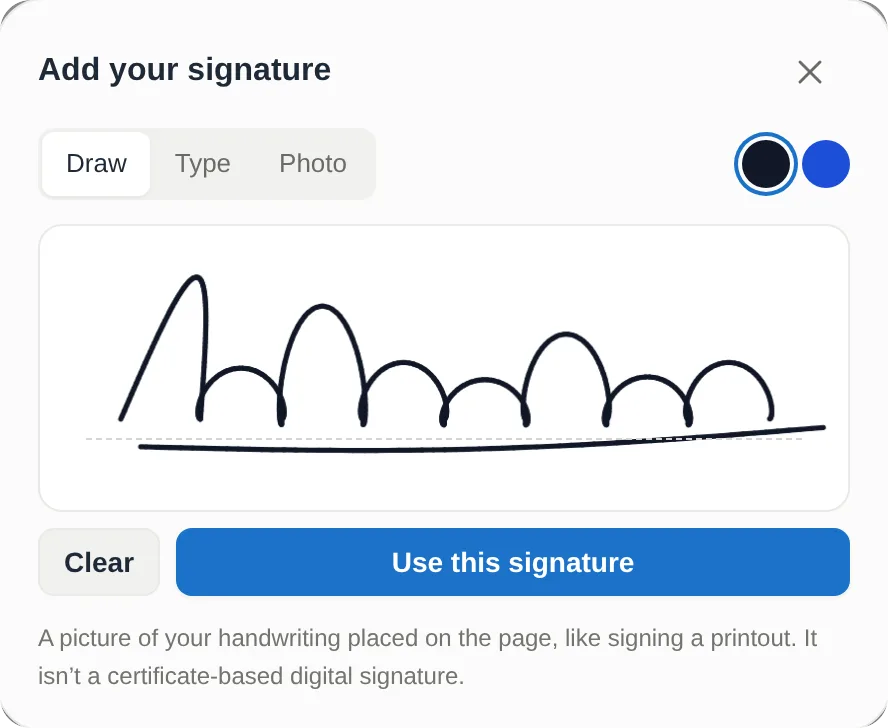
- Make your signature: Draw it with a finger, a stylus or the mouse, Type your name in a handwriting style, or use a Photo of your signature on paper. Drawn and typed signatures come in black or blue ink.
- Tap Use this signature. It lands in the middle of the page you're looking at.
- Drag it onto the line and resize it by its corners.
- Add the date with the Text tool, and fill in any form fields the PDF has.
- Tap Save PDF to download a signed copy.
We tried it on a made-up freelance design agreement between two made-up parties. The signature went onto the designer's line and the date beside it. The saved copy showed both in place when we opened it with Poppler, a separate PDF engine, so it doesn't depend on our reader to display.
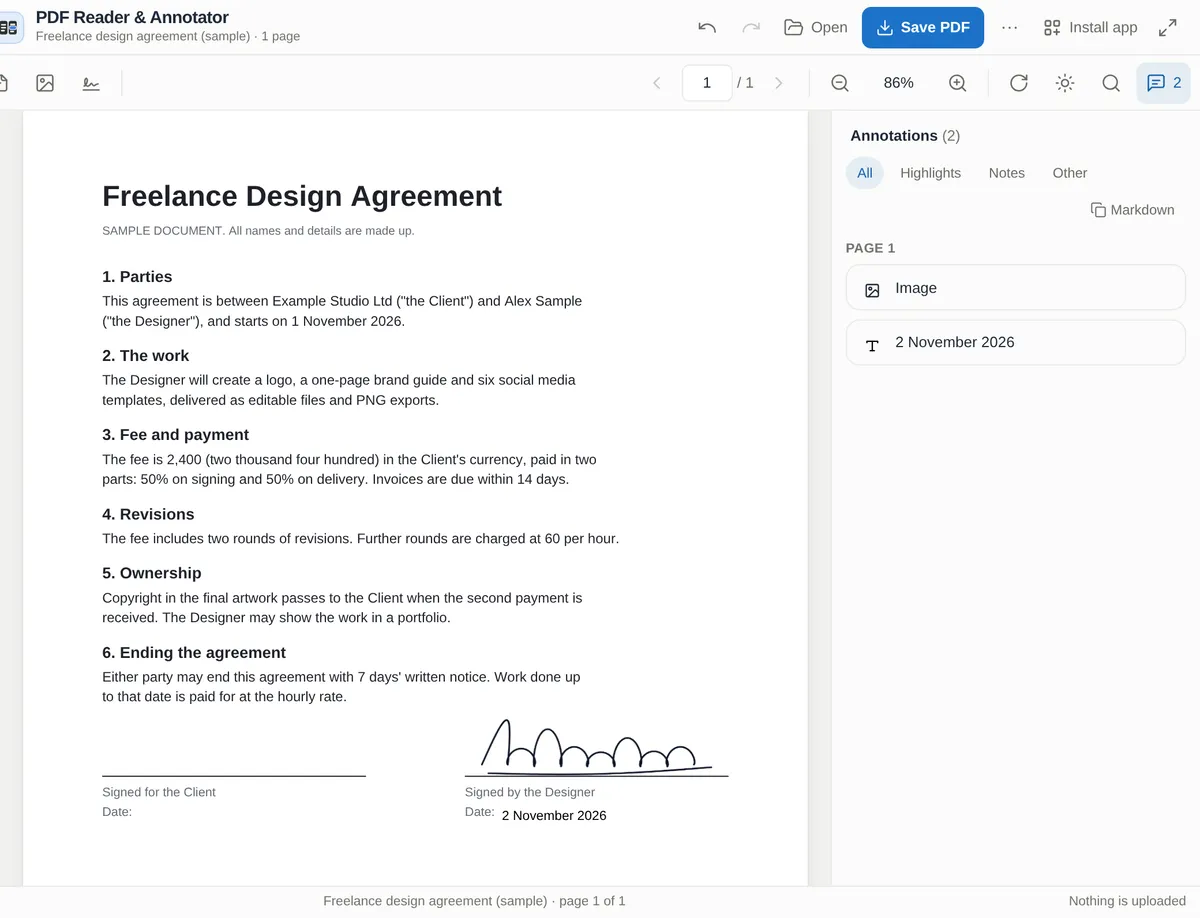
Two details worth knowing. First, the reader saves the signature as a standard PDF stamp annotation, so Preview, Acrobat and the viewers in Chrome, Edge and Firefox all show it, but someone with a PDF editor can also select it and move or delete it. Second, the reader keeps your marks in this browser as you go, so you can close the tab and come back. On a shared computer, delete the signature from the page once you've saved your copy.
If you'd rather the signature be drawn into the page itself, the separate Sign PDF page writes it into the page content instead of a movable annotation, and it forgets your signature when you close the tab. That makes it a little harder to shift around. It doesn't make it more secure, as the next section shows.
Sending the signed copy back? If it holds anything sensitive, you can lock it with a password first and send the password another way.
A picture of a signature can be copied
This is the real weakness of every drawn or typed signature, ours included. It's an image, and images can be lifted out.
We ran our signed test agreement through pdfimages, a free command-line tool that comes with the Poppler PDF library. It listed our signature straight away: a 724 × 194 pixel picture with a transparency mask, ready to extract and paste onto another document. It would have done the same if the signature had been drawn into the page instead of sitting in an annotation. A scanned page with a wet-ink signature has exactly the same problem.
So a picture signature is good for agreeing to things, and not for proving who agreed. Use a proper e-signature service (one that verifies identity, keeps an audit trail and seals the file with a certificate) when:
- the other side asks for one, or a regulator does;
- you're signing for a company or need to prove authority to sign;
- the document is high-value or likely to be disputed: property, a large loan, a shareholder agreement, an employment settlement;
- in the EU, the law or the other party requires an advanced or qualified signature;
- it's one of the carve-outs above (a will, family court papers), which usually need paper, witnesses or a court's own system anyway.
For everything else, a signature placed on your own device does the job and keeps the document off other people's servers.
The short version
- A drawn or typed signature is a legal electronic signature in the US, the EU and the UK for most everyday documents, but nobody is obliged to accept one, and wills and some court and family papers are excluded.
- It isn't a digital signature: there's no certificate and no seal, and the image can be copied.
- Signing websites upload your file; most delete it within hours, and e-sign services keep signed copies on purpose.
- To sign without uploading, open the PDF in our PDF Reader & Annotator, add your signature and the date, and save a copy.
- For high-stakes or regulated documents, use an e-signature service with identity checks and a certificate.
Sources
- United States Code. 15 U.S.C. § 7001 (general rule, and no obligation to use or accept), § 7003 (exceptions) and § 7006 (definitions). Electronic Signatures in Global and National Commerce Act, Pub. L. 106-229 (2000).
- Uniform Law Commission. Uniform Electronic Transactions Act (1999), sections 2(8), 3, 5 and 7.
- European Union. Regulation (EU) No 910/2014 (eIDAS), Article 3(10) to (12), Article 25 and Article 26.
- UK legislation. Electronic Communications Act 2000, section 7.
- Law Commission (2019). Electronic execution of documents.
- ETSI. EN 319 142-1: PAdES digital signatures, part 1.
- Adobe. Fill and sign PDF online.
- Smallpdf. Sign PDF.
- iLovePDF. Security.
- Google. Send signature requests and sign documents with eSignature. Google Drive Help.
- Apple. Fill out and sign PDF forms in Preview on Mac. Preview User Guide.
- Test file: a one-page agreement with made-up parties that we generated as a PDF, signed in our PDF Reader & Annotator in Chrome, October 2026, and checked with qpdf and Poppler's
pdftoppmandpdfimages. Service policies as published on their pages in October 2026.
Share this post
Keep reading
Computing· Oct 11, 2026· 9 min
How to Compare Two Documents and See Every Change
Compare two versions of a contract, essay or code and see every change by line, word or letter, side by side or as track changes, without uploading anything.Computing· Oct 9, 2026· 8 min
How to Merge PDFs Without Uploading Them
Combine PDF files on a Mac, iPhone, Windows PC or in your browser without sending them to anyone's server. Built-in ways, page order, file size and pitfalls.Computing· Oct 14, 2026· 10 min
Does Your Photo Show Where You Live? Check and Remove It
Phone photos can carry GPS coordinates accurate to a few metres. See what yours give away, which apps strip it, and how to remove it before you share.