How to Encrypt a File with a Password and Send It Safely
Lock a file or message with a long passphrase in your browser, then send the file one way and the password another. What protects it, and what doesn't.
Computing··12 min read
Pick a passphrase of five or more random words, encrypt the file in your browser, then send the locked file one way and the passphrase another. Email the file, say, and read the words out on a phone call. Someone who gets into the email finds a file they can't open. Someone who overhears the call has five words and nothing to use them on.
That's the whole method. The rest of this post covers what "encrypted with a password" actually means, why the password does more of the work than the algorithm, how a link can carry a secret without the website ever seeing it, and the handful of mistakes that quietly undo all of it.
Doing it, step by step
Our Encrypt & Decrypt tool does this in your browser, in an open file format called age. Nothing you type or drop on it is uploaded.
- Open Encrypt text for a message, or Encrypt a file for a photo, a PDF or anything else.
- Type a password, or press Suggest for five random words.
- Press Encrypt.
- Pick how to send it: Copy link, Copy as text or Download .age.
- Send the password some other way.
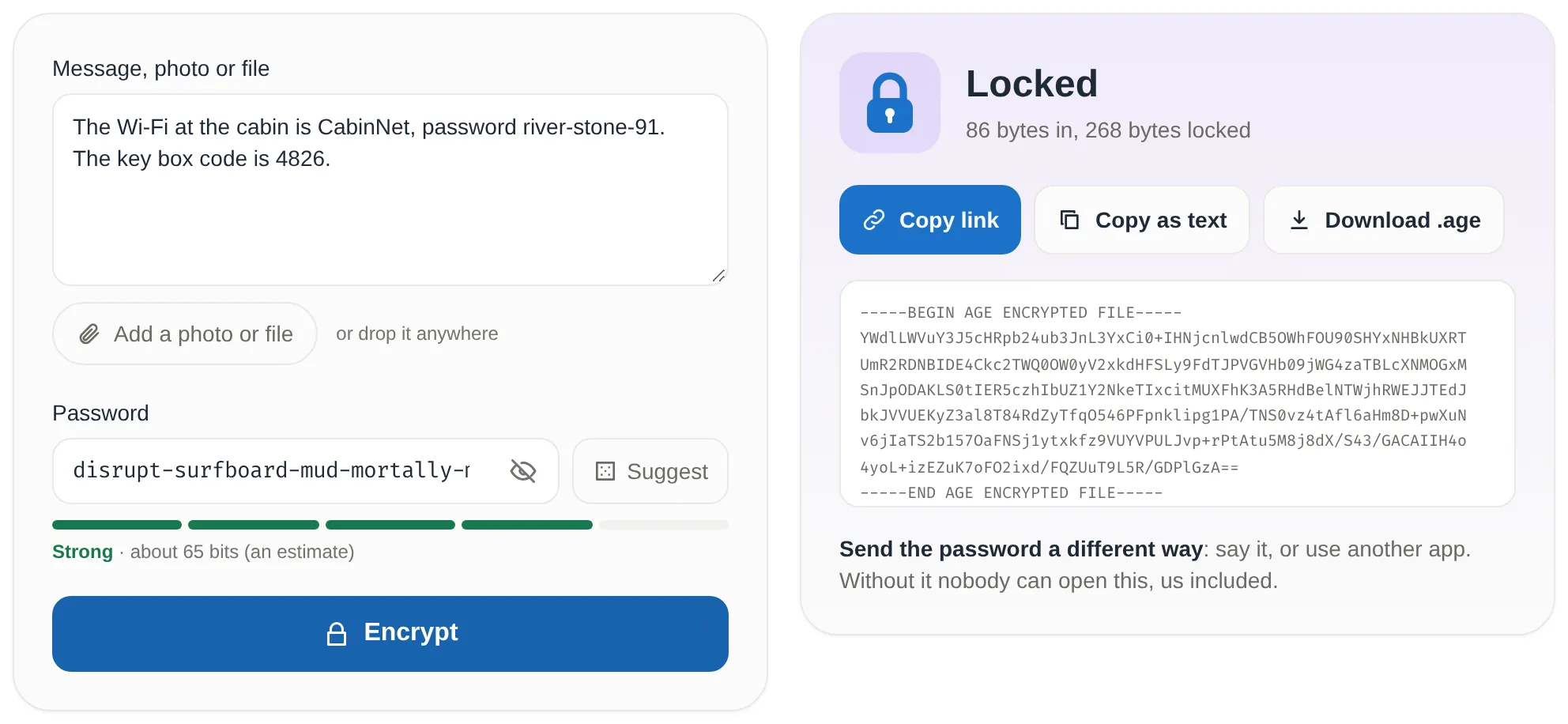
A link is the easiest thing to receive. Opening it lands the other person on the Decrypt side with the message already loaded, so all they type is the password. A text block survives email, chat and notes apps. A .age file is the way to send anything bigger: links are only offered while they stay under 32,000 characters, which keeps them intact in chat apps and email.
What "encrypted with a password" actually means
A password isn't a key. The ciphers that do the real work want random bytes, and "lantern-otter-cinema-maple-frost" isn't random bytes. So the age format turns one into the other, in two layers:
- Every file gets its own file key: 16 random bytes (128 bits) from a secure random generator. That key, not your password, encrypts the data.
- Your passphrase goes through scrypt with a fresh random 16-byte salt, which produces a 32-byte wrap key. The wrap key locks the file key, and the locked file key, the salt and scrypt's settings are written into the file's header.
- The data itself is encrypted with ChaCha20-Poly1305, 64 KiB at a time. That's authenticated encryption: every chunk carries a tag, so a changed byte, a missing chunk or a file cut short fails to open rather than handing you quietly broken output. The header has its own check (an HMAC) as well.
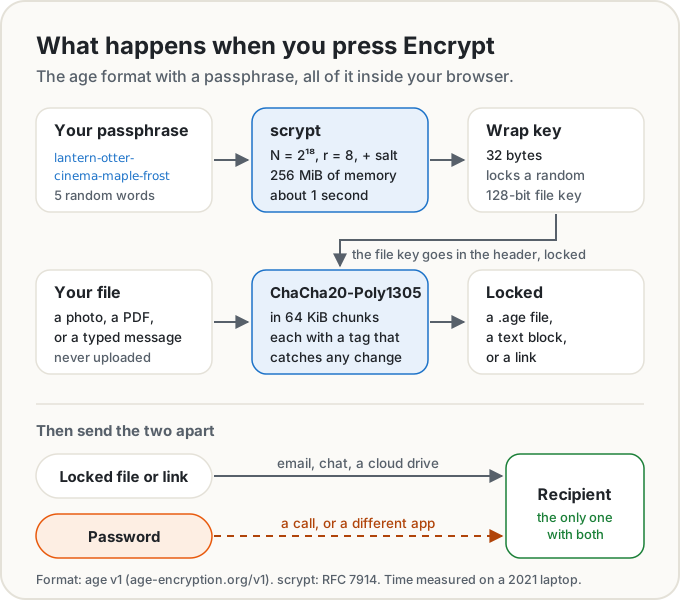
The interesting part is scrypt. RFC 7914 describes it as a memory-hard function: it deliberately needs a lot of memory as well as time, which makes custom guessing hardware expensive to build. With the settings age uses (N = 2¹⁸, r = 8), it fills 2¹⁸ blocks of 1 KiB each, 256 MiB, for every single attempt.
On one core of our 2021 test laptop, that takes about 0.9 seconds in the same JavaScript code the tool runs, and about 0.65 seconds in native code. In Chrome on the same laptop, the whole thing, from pressing Encrypt to seeing the result, took 1.3 seconds. The age project's own source puts its default at "1s on a modern machine". If a phone can't spare 256 MiB, the tool drops to 2¹⁷ (128 MiB, half the work), and the file records which it used, so it still opens anywhere.
A second is nothing to you. You pay it once. Someone trying to guess your passphrase pays it on every guess.
The password matters more than the algorithm
Nobody gets into a file like this by breaking ChaCha20. They guess the passphrase. With a copy of the file they can guess offline, on their own hardware, as fast as they can afford, with no lockout after the hundredth wrong try. The file itself tells them the moment a guess is right.
So the question is how many guesses your passphrase forces. A word picked at random from the EFF's long list of 7,776 words adds about 12.9 bits. Five words is 7,776⁵, about 28 quintillion possible passphrases, or 64.6 bits. An attacker searching them finds yours, on average, halfway through.
Now give the attacker a generous budget: a million scrypt guesses a second. At about a second per guess per core, that's roughly a million laptop cores working at once, with some 268 terabytes of memory busy at the same moment. Here's how long they'd need, on average:
| Passphrase | Possibilities | Average time to guess |
|---|---|---|
| 8 random lower-case letters | 209 billion | 29 hours |
| 3 random words | 470 billion | 2.7 days |
| 4 random words | 3.7 quadrillion | 58 years |
| 5 random words (what Suggest gives you) | 28 quintillion | 450,000 years |
| 6 random words | 221 sextillion | 3.5 billion years |
Suggest draws from that list minus four hyphenated words, which makes no difference at this scale. For comparison, those same five words stored behind a fast hash and attacked at 10 billion guesses a second (the assumption in our password length post) would fall in about 45 years. scrypt's slowness is worth a factor of 10,000 here.
But look at the top of the table. scrypt multiplies the attacker's cost per guess. It can't rescue a password that's guessed in the first few tries, and guessing tools start with the patterns people actually use: NIST's own example is "Password1!". A short password, a reused one or one with a name and a year in it is the weak point, however good the encryption around it.
The "random" matters as much as the count. Five words you chose because they go together are far weaker than five a machine picked. Our passphrase generator picks them from the EFF list with the browser's secure random source. For something that has to stay secret for decades, use six or seven words.
How a link carries the secret without the website seeing it
Copy link puts the whole locked file at the end of the link, after #age=. Everything after the # is the fragment, and it's handled differently from the rest of the address.
RFC 3986, the standard for web addresses, says the fragment is "dereferenced solely by the user agent", which means your browser. HTTP agrees: the address a browser actually requests leaves the fragment out, because fragments are "reserved for client-side processing" (RFC 9110, §7.1). Browsers also strip it from the Referer header they send to other sites (Referrer Policy).
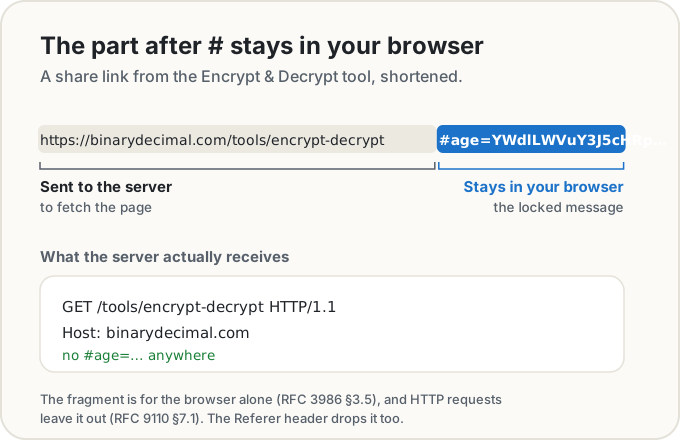
So when your friend opens the link, our server sees an ordinary request for the tool page. The page's own script reads the fragment in their browser and decrypts it there. Our own analytics are never given the fragment either.
Two honest caveats. The link is the locked file, so the chat app or email provider you paste it into has a copy of it, and the passphrase is all that stands between them and the contents. That's the offline-guessing case from the table above. And the link stays in the browser history of whoever opens it, still locked, still useless without the password.
Opening the file somewhere else
Nothing here ties you to our site. age has a free command-line tool, also called age, for Mac (brew install age), Windows (winget install --id FiloSottile.age) and Linux (apt install age on Debian and Ubuntu). Its README says passphrase-protected files are "automatically detected at decrypt time", and the manual says it decodes text blocks the same way. So age -d is all you need.
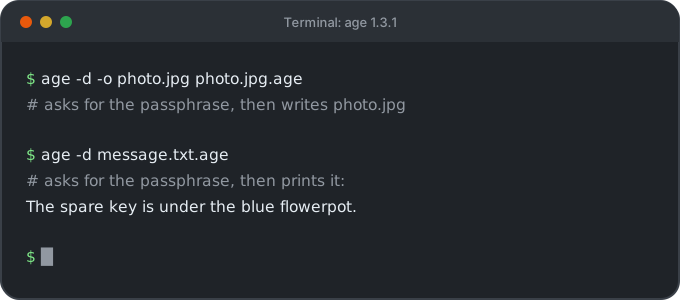
We checked this rather than taking it on trust: a message and an image locked by the tool's own code, as a .age file and as a text block, all opened with age 1.3.1, and the image came back byte for byte identical. The format is published, so other programs read it too, such as the Rust version (rage) and typage, the TypeScript library our tool is built on. If this site vanished tomorrow, your files would still open.
Mistakes that undo it
Sending the password with the file. The same email, a second email to the same inbox, the subject line, a note inside the zip. Anyone who gets into that one place gets both halves. Use a different channel: a call, a text message when the file went by email, or tell them in person.
A short, common or reused password. See the table. A password you've used on any website may already be on a leaked list, and those get tried first.
Trusting old ZIP passwords. Many zip tools still offer "ZipCrypto", the original ZIP password protection. The ZIP specification itself (APPNOTE 6.3.9, §6.0.1) calls it "weak by today's standards" and recommends it only for low-security uses or compatibility. As far back as 1994, Biham and Kocher showed how to recover the internal key that decrypts the archive in a few hours on a personal computer from a few hundred bytes of known content, without guessing the password at all. If you have to send a zip, 7-Zip offers AES-256 instead, though the person receiving it then needs 7-Zip, WinZip or another program that reads it.
A file name that gives it away. The tool names the locked file after the original, so 2025-tax-return.pdf becomes 2025-tax-return.pdf.age. The name isn't encrypted, and nor is the rough size: the locked file is your file plus a small overhead. Rename it first if the name says too much.
Losing the password. There's no reset. Nobody else holds a copy of the key, which is the point. Keep the passphrase in a password manager.
What encryption can't protect
A password-locked file is safe while it travels and while it sits in someone's inbox or cloud drive. It isn't safe from a compromised device. Malware on your computer can read the file before you lock it and watch you type the password, and malware on the recipient's computer can do the same after they open it. Once they've opened it, the recipient can also copy it, forward it or screenshot it, and nothing in the file can stop them.
So "unbreakable" isn't the right word for this, and nor is anything with "military" in it. The right claim is narrower and more useful: with a long random passphrase sent separately, nobody who intercepts the file can read it, and the people running the website it was made on never had it to begin with.
The short version
- Use five or more random words as the passphrase, or let Suggest pick them.
- Encrypt in the browser, on a page that doesn't upload what you give it.
- Send the locked file and the passphrase by two different routes.
- Skip ZipCrypto. Rename files whose names give too much away.
- Store the passphrase somewhere safe, because nobody can reset it.
Sources
- C2SP. The age file format, v1: file key, scrypt recipient stanza, header MAC, the ChaCha20-Poly1305 payload in 64 KiB chunks, and ASCII armor.
- IETF. RFC 7914: The scrypt Password-Based Key Derivation Function, August 2016: memory-hard design (abstract) and scryptROMix's N blocks of 128 × r bytes (§6).
- Filippo Valsorda and the age authors. age README (installation, passphrases,
age -d), manual page (armor is detected on decrypt) and scrypt.go (default work factor 18, "1s on a modern machine"). - typage, the TypeScript implementation of age the tool uses.
- Electronic Frontier Foundation. New wordlists for random passphrases, July 2016: 7,776 words, about 12.9 bits a word.
- IETF. RFC 3986, §3.5 Fragment, January 2005, and RFC 9110, §7.1 Determining the Target Resource, June 2022.
- W3C. Referrer Policy, §8.4 Strip url for use as a referrer.
- National Institute of Standards and Technology. SP 800-63B-4, Appendix A, July 2025: how people meet composition rules, and why length matters.
- PKWARE. .ZIP File Format Specification (APPNOTE) 6.3.9, §6.0.1: traditional PKWARE encryption "considered weak".
- Eli Biham and Paul C. Kocher. A known plaintext attack on the PKZIP stream cipher, Fast Software Encryption 1994 (published 1995).
- 7-Zip help. Add to Archive dialog: ZipCrypto or AES-256 for ZIP.
- Our own measurements: scrypt at N = 2¹⁸, r = 8 took about 0.9 s in @noble/hashes (the code the tool runs) and 0.65 s in Node's native scrypt, on one core of an AMD Ryzen 7 PRO 5850U. Encrypting a short message on the tool page took 1.3 s in headless Chrome on the same machine. Files made with the tool's code were opened with age 1.3.1. Guessing times are half of all possibilities divided by the guess rate.
Share this post
Keep reading
Computing· Oct 9, 2026· 10 min
How Long Should a Password Be? What NIST Says Now
NIST now asks for at least 15 characters, with no symbol rules and no forced changes. What the standard says, the maths of length, and passphrases.Computing· Oct 9, 2026· 9 min
Is It Safe to Scan a QR Code? How to Check Where It Goes
Most QR codes are fine, but stickers on parking meters and codes in emails are a known scam. How quishing works and how to read a link's real domain first.Computing· Oct 14, 2026· 10 min
Does Your Photo Show Where You Live? Check and Remove It
Phone photos can carry GPS coordinates accurate to a few metres. See what yours give away, which apps strip it, and how to remove it before you share.