How Long Should a Password Be? What NIST Says Now
NIST now asks for at least 15 characters, with no symbol rules and no forced changes. What the standard says, the maths of length, and passphrases.
Computing··10 min read
At least 15 characters if the password is the only thing standing between someone and your account. That's the minimum in NIST's current password guidance, SP 800-63B-4, published in final form in July 2025. If the password is one part of multi-factor sign-in, the floor drops to 8.
In practice, that works out to two habits. Let a password manager make 16 or more random characters for every site. For the few passwords you have to type from memory, use six or seven random words. The rest of this post explains where those numbers come from, what else NIST changed, and how fast a stolen password actually falls.
What the new NIST rules say
NIST's Digital Identity Guidelines are written for US government systems, but plenty of other organisations borrow them. The 2025 revision (Special Publication 800-63B-4) puts the password rules in section 3.1.1.2. In NIST's language, SHALL is a hard requirement and SHOULD is a strong recommendation.
| Topic | What SP 800-63B-4 says |
|---|---|
| Minimum length | 15 characters when the password is used on its own (SHALL). 8 when it's part of multi-factor sign-in. |
| Maximum length | Allow at least 64 characters (SHOULD). |
| Which characters | Accept every printable ASCII character, spaces and Unicode (SHOULD). |
| "Must include a symbol" rules | Not allowed (SHALL NOT). |
| Scheduled password changes | Not allowed (SHALL NOT). A change is required when there's evidence the password leaked. |
| Breached and common passwords | Check new passwords against a blocklist (SHALL). |
| Password managers | Allow them and autofill (SHALL). Allow paste (SHOULD). |
| Hints and security questions | Not allowed (SHALL NOT). |
| Wrong guesses | Lock the password after at most 100 failures in a row (section 3.2.2). |
Much of this isn't new. The 2017 version, SP 800-63B, already said sites SHOULD NOT impose composition rules or force periodic changes, with a minimum of 8 characters. The new version turns both into SHALL NOT and raises the minimum for a password used alone to 15.
Why the symbol rules went
Rules like "one capital, one number, one symbol" were meant to make passwords harder to guess. People meet them in the most predictable way possible. NIST's own appendix on password strength gives the example: someone who'd have picked "password" picks "Password1" when a capital and a number are required, and "Password1!" when a symbol is too. Guessing software tries exactly those patterns early.
The appendix concludes that length is a primary factor in password strength, and that blocklists, slow hashing, machine-generated passwords and rate limiting do more against guessing than extra rules do.
Why forced changes went
When people have to change a password every few months, they change it a little. Researchers at the University of North Carolina, studying real accounts, found that for 17% of accounts, knowing the old password let them guess the new one in fewer than five tries. The FTC's chief technologist at the time summed up the study: people forced to change often pick weaker passwords to begin with, then change them in predictable ways.
So the rule now is simple. Change a password when it may have leaked, not because a calendar says so.
How long a password takes to guess
Each character a machine picks at random from the 94 printable keyboard symbols multiplies the possibilities by 94. Each word picked at random from a 7,776-word list multiplies them by 7,776. An attacker who tries every possibility finds the right one, on average, halfway through.
Here's what that means at 10 billion guesses a second:
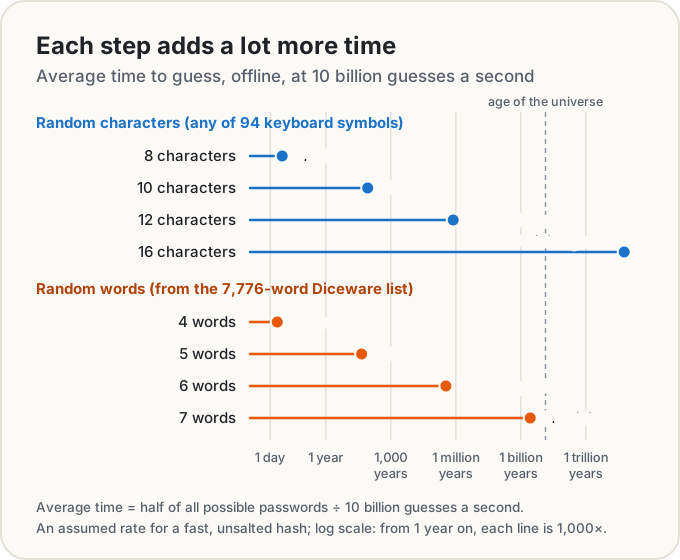
Every extra character multiplies the time by 94, so two more characters turn days into decades. Four random words are about as strong as eight random characters. Six words beat ten characters easily.
These numbers only hold if a machine picks the characters or words. A password you made up, like a pet's name with a year and an exclamation mark, is nowhere on this chart. Guessing tools start with the patterns people actually use.
Who's guessing, and how fast
The 10 billion a second in that chart is an assumption, so who could actually guess that fast? It depends on where the attacker is guessing.
Online, an attacker types guesses into the real login page. The site can see that and stop it: NIST tells sites to lock a password after at most 100 wrong guesses in a row. A hundred guesses is nothing against even a short random password. What gets you caught online is a password on everyone's list of common or breached passwords, which is why the blocklist is a requirement. NIST even notes that a huge blocklist adds little, because throttling already limits online guessing. One free source for that list is Have I Been Pwned's Pwned Passwords, which a site can query by sending just the first five characters of the password's hash.
Offline, the attacker has stolen the site's password database and guesses on their own hardware, with no lockout. Here everything depends on how the site stored your password, and you can't see that. A site using a deliberately slow, salted hash like bcrypt can cost the attacker millions of times more work per guess than one using a fast hash like MD5.
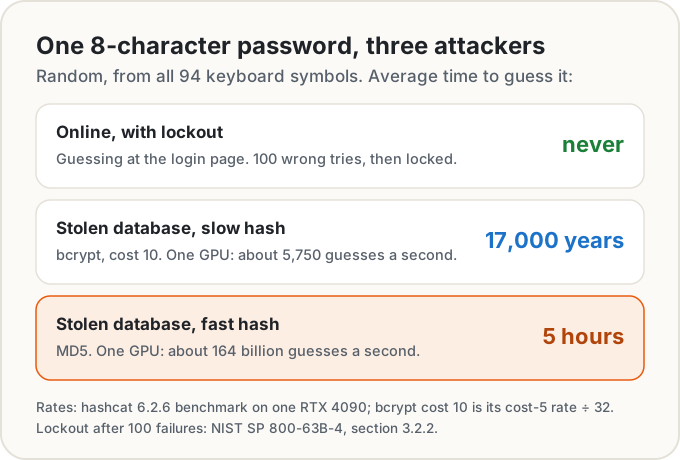
Those rates come from a public hashcat benchmark of a single RTX 4090, a gaming graphics card: 164 billion MD5 guesses a second, and 184,000 a second for bcrypt at cost 5. Each step up in bcrypt's cost halves the speed, so cost 10 is 32 times slower: about 5,750. An attacker with a rack of cards goes faster again, which is why the chart's 10 billion a second is a modest figure for a fast hash.
That's the real case for long passwords. You're not choosing a length for the site that does everything right. You're choosing one that survives the site that stored your password badly and then got breached. Sixteen random characters, or six or seven random words, still hold up there.
One more thing length can't fix: reuse. Once a password leaks from one site, attackers try it on others, and no length helps when they already have it. One password per site, every time.
Passphrases: length you can remember
A passphrase is several words picked at random, traditionally by rolling dice. The original Diceware list has 7,776 words, because five dice give 6⁵ = 7,776 combinations, and the EFF's long word list uses the same size. Each word is worth about 12.9 bits. The EFF recommends at least six words, which gives about 2⁷⁷ possible passphrases, and Diceware's author suggests seven or more for high-value uses like disk encryption.
Six random words are about as hard to guess as 12 random characters, and far easier to type on a phone or remember for your laptop login. Use them for the handful of passwords you can't paste: your password manager's master password and your computer's login, say.
The word "random" is doing the work again. A line from a song, or four words you picked because they go together, is a different and much weaker thing.
Our Password Generator
Our Password Generator makes both kinds, on your device. It uses the browser's crypto.getRandomValues, the cryptographically secure random source built into every modern browser, with rejection sampling so no character or word is favoured over another. Nothing is sent anywhere, and the password never goes into the page link: the link carries your settings only.
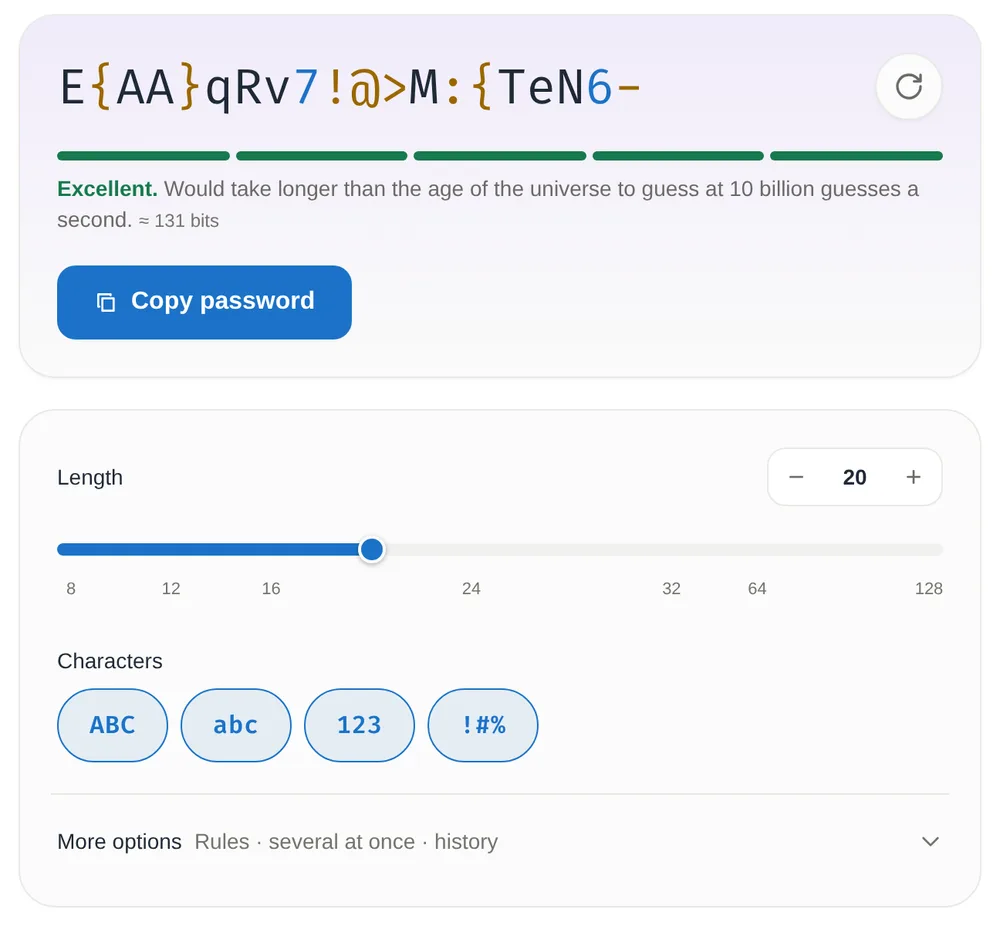
In Password mode you choose a length from 8 to 128 and which sets to use. Every ticked set appears at least once, and under More options you can drop look-alike characters such as 0 and O, or ask for no repeats. The line under the password gives the time to guess at 10 billion guesses a second, the same assumption as the chart above. History is off unless you turn it on, and then it stays in your browser.
In Passphrase mode it picks 4 to 8 words from the EFF's long word list, with a separator, capitals and an optional two-digit number added to one word.
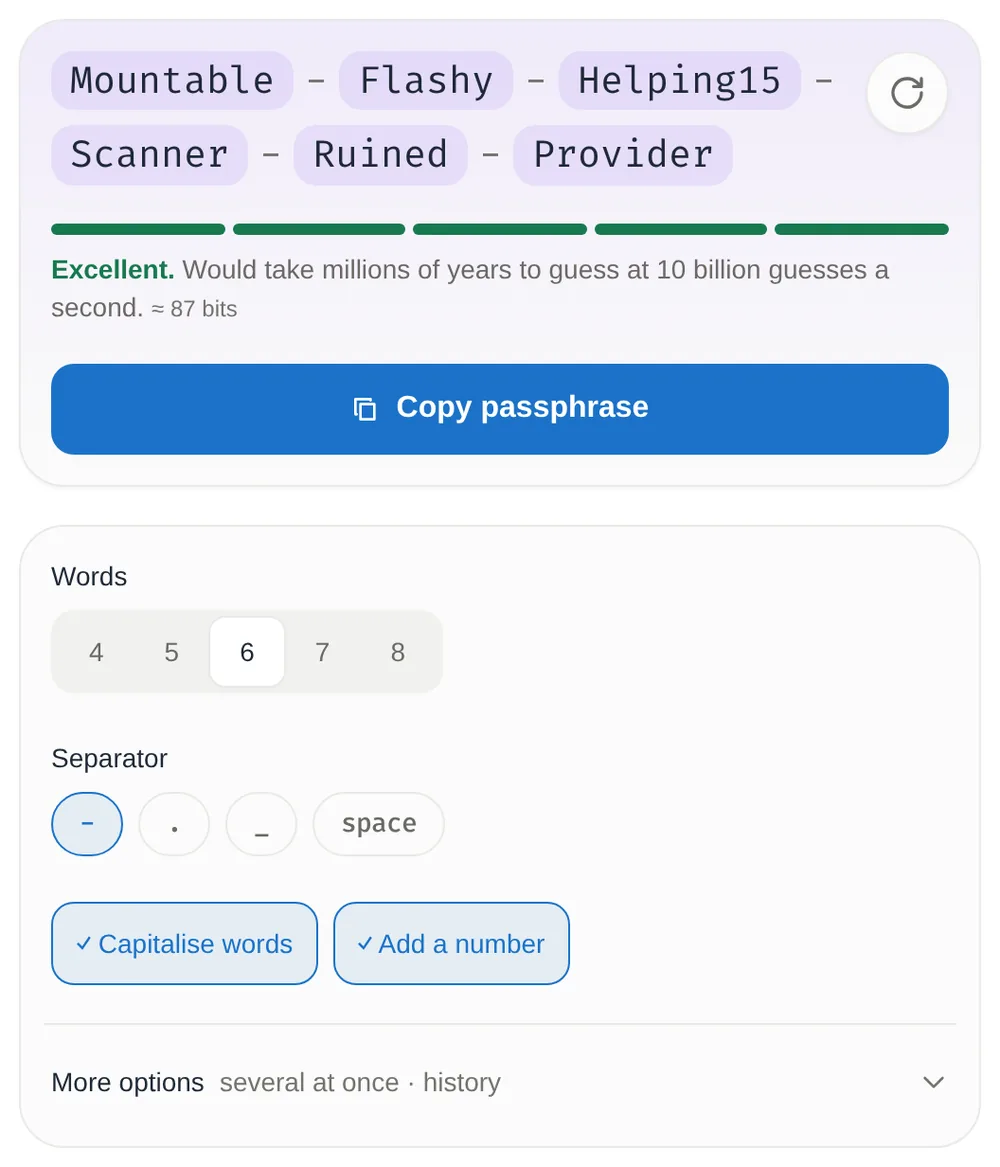
It uses 7,772 of the list's 7,776 words: the four with hyphens, like t-shirt, are left out, so a hyphen always separates two words. That still leaves about 12.9 bits a word. The default five words come to about 65 bits, several decades of guessing at 10 billion a second. Six words with a number come to about 87 bits. For a password manager's master password, take seven or eight words, about 90 or 103 bits. (Don't use the examples in these screenshots, obviously.)
Better than any password: passkeys and a second factor
Length protects against guessing. It does nothing if you type your password into a convincing fake login page. That's what multi-factor authentication and passkeys are for.
The US Cybersecurity and Infrastructure Security Agency (CISA) says people who turn on multi-factor authentication are significantly less likely to get hacked. It also says the only widely available phishing-resistant kind is FIDO authentication, because the protocol refuses to sign in to a fake site.
Passkeys are that FIDO technology made friendly. The FIDO Alliance describes a passkey as a credential based on FIDO standards, stored on your phone, computer or a hardware security key. You sign in the way you unlock your device, with a fingerprint, face or PIN, and there's no shared secret for a fake site to steal. NIST's new guidelines cover passkeys that sync between your devices in a separate appendix on syncable authenticators.
Where a site offers a passkey, take it. Where it doesn't, use a long random password and turn on a second factor.
The short version
- Let a password manager make a random password of 16 or more characters for every site, and never reuse one.
- For passwords you must remember, use six or seven random words from a 7,776-word list.
- Turn on a second factor everywhere, and use passkeys where you can.
- Change a password when it may have leaked, not on a schedule.
- Running a site? At least 15 characters, allow 64 or more, no composition rules, a blocklist, paste allowed, and a slow salted hash.
Sources
- National Institute of Standards and Technology. SP 800-63B-4, Digital Identity Guidelines: Authentication and Authenticator Management, July 2025: section 3.1.1.2 (password verifiers), section 3.2.2 (rate limiting), Appendix A (strength of passwords) and Appendix B (syncable authenticators). Publication record.
- National Institute of Standards and Technology. SP 800-63B (2017, updated 2020), section 5.1.1.2, the previous password rules.
- Lorrie Cranor, Federal Trade Commission. Time to rethink mandatory password changes, March 2016.
- hashcat 6.2.6 benchmark on an RTX 4090: MD5, bcrypt and other hash speeds.
- Electronic Frontier Foundation. Dice-generated passphrases and the long word list.
- Arnold Reinhold. The Diceware passphrase home page.
- Have I Been Pwned. Pwned Passwords: breached passwords, checked by sending only the first five characters of the hash.
- Cybersecurity and Infrastructure Security Agency. More than a password.
- FIDO Alliance. Passkeys.
- Guessing times: our own arithmetic. Average time is half of all possibilities divided by the guess rate; 94 symbols per character, 7,776 words per word.
Share this post
Keep reading
Computing· Oct 9, 2026· 12 min
How to Encrypt a File with a Password and Send It Safely
Lock a file or message with a long passphrase in your browser, then send the file one way and the password another. What protects it, and what doesn't.Computing· Oct 9, 2026· 9 min
Is It Safe to Scan a QR Code? How to Check Where It Goes
Most QR codes are fine, but stickers on parking meters and codes in emails are a known scam. How quishing works and how to read a link's real domain first.Computing· Oct 14, 2026· 10 min
Does Your Photo Show Where You Live? Check and Remove It
Phone photos can carry GPS coordinates accurate to a few metres. See what yours give away, which apps strip it, and how to remove it before you share.