Is It Safe to Scan a QR Code? How to Check Where It Goes
Most QR codes are fine, but stickers on parking meters and codes in emails are a known scam. How quishing works and how to read a link's real domain first.
Computing··9 min read
Scanning a QR code is usually safe. A QR code holds a short piece of text, most often a web address, and your phone shows you that address before it opens anything. The risk is where the address takes you. So read the real domain in the link before you tap it, and be most careful with codes stuck on payment machines or sent to you in emails and texts.
The UK's National Cyber Security Centre puts it plainly: QR codes in pubs and restaurants are "probably safe", while codes in open spaces like stations and car parks "might be riskier". The rest of this post covers how the scams work, what official guidance from the FBI, FTC and NCSC says, and how to read a link so you know who really runs the site.
How QR code scams work
A QR code hides its link. You can read a dodgy web address in a text message, but a QR code is just a square of black and white blocks, so you only find out where it goes after you scan it. Scammers use that in a few ways.
Stickers over real codes. The FTC has warned about "scammers covering up QR codes on parking meters with a QR code of their own". The fake code opens a convincing payment page, you type in your card details, and they go to the scammer. The FBI described the same trick in a January 2022 public service announcement: criminals swap real QR codes, on paper and on screens, for ones that lead to fake sites built to steal logins and money, and some swap payment codes so the money goes to their own account. The FBI also warns that a malicious code can be used to get malware onto your phone, which is why you shouldn't install anything a code offers you.
Fake notices. The FTC lists messages saying a parcel couldn't be delivered, or that there's a problem with your account, that ask you to scan a code to sort it out. The urgency is the point: it rushes you past checking.
QR codes in phishing emails ("quishing"). This one is growing. The NCSC explains why criminals like it: people are now wary of odd-looking links in emails, and "not all security tools designed to detect phishing emails will scan images", so a QR code pointing at a bad site can slip past the filter. It also moves you from a work computer, with its company security, to your personal phone.
Scams with a second step. The NCSC notes that QR fraud in public places often comes with social engineering. In the case it cites, a woman was caught out at a railway station and criminals posing as bank staff then rang her to keep the deception going.
For perspective, the NCSC also says QR code fraud in the UK is "relatively small compared to other types of cyber fraud". It's worth a habit, not a fear of every code you see.
How to read where a link really goes
This is the skill that does most of the work, and it takes a few seconds. Every web address has one part that says who runs the site: the name just before the ending (.com, .org, .co.uk and so on). Everything before that name is a subdomain, which whoever owns the site can set to anything they like. Everything after the first single slash is the path, which can also say anything.
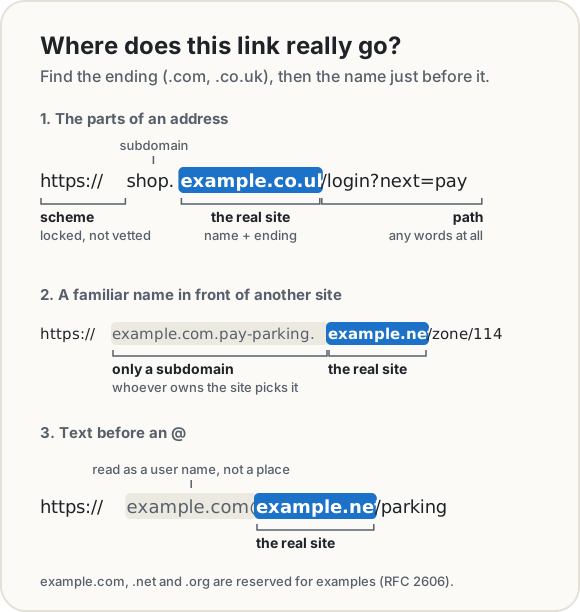
So the method is: find the ending, then read the name right before it. That pair is the site.
shop.example.co.uk/loginis run by example.co.uk.example.com.pay-parking.example.netis run by example.net. The familiar name at the front is decoration.example.com@example.netis run by example.net too. Browsers treat the part before an @ as a user name, not a place.
Two more things to look at while you're there. A padlock or https means the connection is encrypted, not that the site is honest: anyone can get a certificate for the domain they own. And a short link (bit.ly, tinyurl.com and the like) hides the destination completely, so you can't check it until it opens.
What your phone shows before it opens anything
Neither iPhone nor Android opens a scanned link by itself. Both show it first and wait for you to tap, and that pause is your chance to read the domain.
- iPhone. Open the Camera, hold the code in the frame, and Apple says to "tap the link that appears at the bottom of the screen". There's also a Scan Code control you can add to Control Center.
- Android (Pixel). In the Camera app, with "Camera scan suggestions" turned on, Google says the phone "shows a bubble or link on the screen" and you tap it to open. You can also use the Scan QR code button in Quick Settings, or Google Lens. Other Android phones work in a similar way, but the menus vary by maker.
If the link in that preview is cut short and you can't see the domain, don't tap and hope. Both the FBI and the NCSC recommend using the scanner built into your phone rather than downloading a separate QR scanner app.
The habits that stop most QR scams
- Read the domain before you tap. Is it the business you expect? Look for misspellings and swapped letters, which the FTC specifically warns about.
- Don't pay through a sticker. Check parking meters and payment machines for a sticker on top of the printed code, as the FBI advises. If you need to pay, type the operator's web address yourself or use their official app.
- Don't enter card details or logins on a page you reached from a code unless you've checked the domain. The FBI's advice for payments is to "manually enter a known and trusted URL".
- Don't install apps from a QR code. Get them from your phone's official app store.
- Treat codes in emails and texts like links in emails and texts. If a message says there's a problem with a parcel or an account, go to the company's site or call them on a number you already trust.
- Keep your phone updated and use multi-factor authentication on important accounts, so a stolen password alone isn't enough.
If you've already typed card details into a page you're unsure about, call your bank on the number on your card. In the US you can report it at ReportFraud.ftc.gov and the FBI's IC3. In the UK the NCSC explains how to report scam messages and websites.
Checking a code before you open it, in your browser
Our QR Code Scanner is built for the "where does this go?" question. Point your camera at a code, or drop in a photo or screenshot, and it reads the code on your device. Nothing is uploaded, and it never opens the link by itself. It shows the full address, with the real domain in large type and highlighted in place, and it checks for the tricks above.
To show how it reads an address, we made two harmless codes: one for https://example.com/parking/pay?zone=114, and a look-alike for examp1e.com, with the digit 1 instead of the letter l.
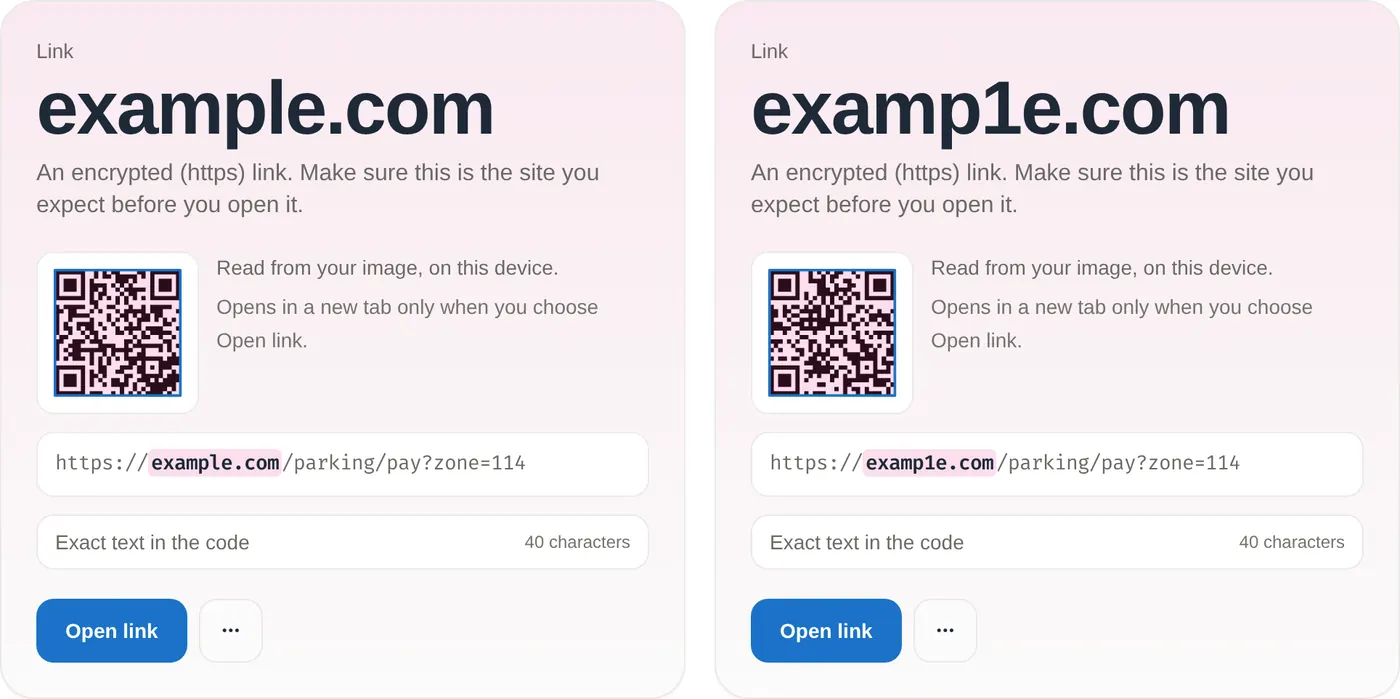
Notice what the tool can't do here: neither one gets a warning, because examp1e.com is a perfectly valid address. Software can't know which site you were expecting. What it can do is put the domain in front of you, big and on its own, which makes a swapped letter much easier to spot than in a cramped preview at the bottom of a camera screen.
The structural tricks are different, because those can be detected from the address alone.
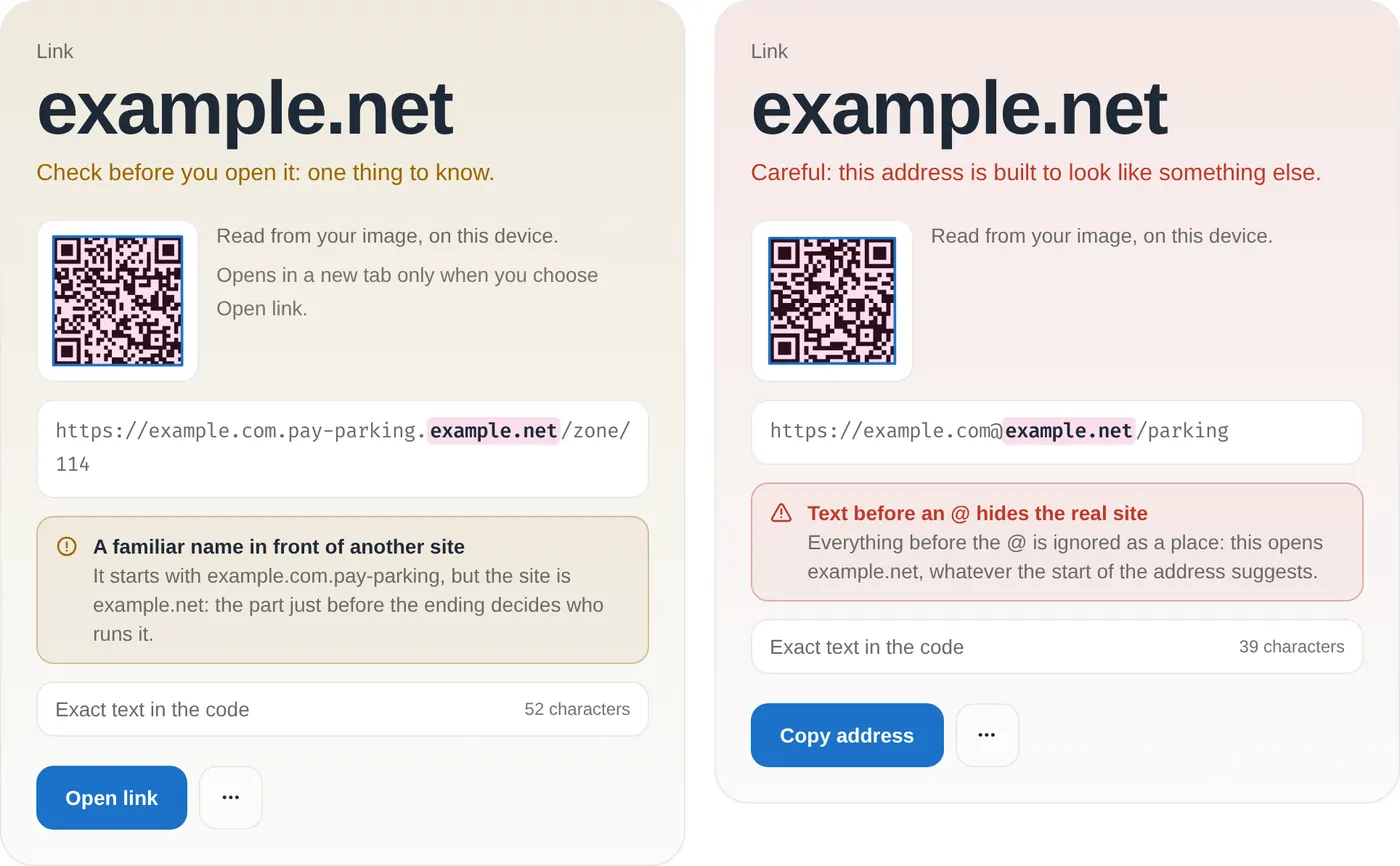
Here's everything it checks, all without fetching the link:
- The real domain, worked out with the common endings from the Public Suffix List (so
shop.example.co.ukgivesexample.co.uk, notco.uk). - A familiar name in front of another site, like the parking example above.
- Text before an @, which hides the real site. When it finds this, the tool offers to copy the address instead of opening it.
- Look-alike letters from other alphabets, such as a Cyrillic "а" in place of a Latin "a". Browsers turn these names into an
xn--form, and the tool decodes it to show which alphabets are mixed. - Short links, a raw IP address instead of a name, and plain
httpwithout encryption.
It doesn't look the address up in a list of known scam sites, because that would mean sending what you scanned to a server. So it can't tell you a site is safe. It tells you exactly where the link goes, and you decide.
For everyday scans, your phone's camera is fine. The scanner earns its place when the code is in an email or a screenshot on your computer, when the preview on your phone is too small to read, or when you'd simply like the domain spelled out before you commit.
The short version
- A QR code is usually just a link in disguise. Scanning it shows you the link; opening it is the step to think about.
- Be most careful with codes on parking meters and payment machines, and codes in emails and texts.
- Read the name right before the ending (.com, .co.uk). That's who runs the site.
- Don't pay, log in or install apps from a scanned code unless you've checked the domain.
- Use your phone's built-in scanner, and take a second to read the link it shows before you tap.
Sources
- FBI Internet Crime Complaint Center. Cybercriminals Tampering with QR Codes to Steal Victim Funds, public service announcement I-011822-PSA, 18 January 2022.
- Federal Trade Commission. Scammers hide harmful links in QR codes to steal your information, consumer alert, 6 December 2023.
- National Cyber Security Centre (UK). QR codes: what's the real risk?, blog post, 8 February 2024.
- Apple. Scan a QR code with your iPhone camera. iPhone User Guide.
- Google. Scan QR codes with your Pixel phone. Pixel Camera Help.
- Public Suffix List, Mozilla.
- RFC 3492. Punycode (the
xn--form of international domain names). - RFC 2606. Reserved Top Level DNS Names (example.com, .net and .org are reserved for examples).
Share this post
Keep reading
Computing· Oct 9, 2026· 12 min
How to Encrypt a File with a Password and Send It Safely
Lock a file or message with a long passphrase in your browser, then send the file one way and the password another. What protects it, and what doesn't.Computing· Oct 9, 2026· 10 min
How Long Should a Password Be? What NIST Says Now
NIST now asks for at least 15 characters, with no symbol rules and no forced changes. What the standard says, the maths of length, and passphrases.Computing· Oct 14, 2026· 10 min
Does Your Photo Show Where You Live? Check and Remove It
Phone photos can carry GPS coordinates accurate to a few metres. See what yours give away, which apps strip it, and how to remove it before you share.